I am looking at enabling ccache in my projects, and I got it working on/with almost all the platforms/generators that I need. The “Professional CMake” book was a great help with that (big thanks to @craig.scott, as usual).
But one specific combination of a generator and a toolset turned out to be problematic - it is Visual Studio generator and ClangCL toolset (with the intention to use Clang/LLVM). To clarify, it is all good with a “bare” Visual Studio generator and “default” toolset value (such as v143), the problem only occurs when -T ClangCL is provided.
I’ve made a minimal example project here. The ccache.cmake module is based on a reduced fragment of Appendix A from the book (won’t copy-paste the entire contents, besides only Visual Studio part is relevant here).
First, like I said, default MSVC toolset configures and builds fine:
> cd e:/path/to/project
> mkdir build
> cd build
> cmake -G "Visual Studio 17 2022" -DCMAKE_INSTALL_PREFIX="../install" -DUSING_CCACHE=YES ..
> cmake --build . --target install --config Release -- /m
generated launch-cl.cmd contains the following:
@echo off
set CCACHE_SLOPPINESS=pch_defines,time_macros
"D:\programs\ccache\ccache.exe" "E:/tools/vs/vs2022/VC/Tools/MSVC/14.44.35207/bin/Hostx64/x64/cl.exe" %*
and the generated *.vcxproj contains this:
<PropertyGroup Label="Globals">
  <ProjectGuid>{9AA40D43-2AF4-391C-BE32-E755F2A361D0}</ProjectGuid>
  <Keyword>Win32Proj</Keyword>
  <CLToolExe>launch-cl.cmd</CLToolExe>
  <CLToolPath>e:/path/to/project/build</CLToolPath>
  ...
But then, if I add -T ClangCL to the configuration (in a clean/fresh build):
> cd e:/path/to/project
> mkdir build
> cd build
> cmake -G "Visual Studio 17 2022" -DCMAKE_INSTALL_PREFIX="../install" -DUSING_CCACHE=YES -T ClangCL ..
then generated launch-cl.cmd will contain the following:
@echo off
set CCACHE_SLOPPINESS=pch_defines,time_macros
"D:\programs\ccache\ccache.exe" "E:/tools/vs/vs2022/VC/Tools/Llvm/x64/bin/clang-cl.exe" %*
so now it correctly got the clang-cl.exe compiler. And the generated *.vcxproj will contain the same part as before:
<PropertyGroup Label="Globals">
  <ProjectGuid>{9AA40D43-2AF4-391C-BE32-E755F2A361D0}</ProjectGuid>
  <Keyword>Win32Proj</Keyword>
  <CLToolExe>launch-cl.cmd</CLToolExe>
  <CLToolPath>e:/path/to/project/build</CLToolPath>
  ...
although the full *.vcxproj will have some differences, such as:
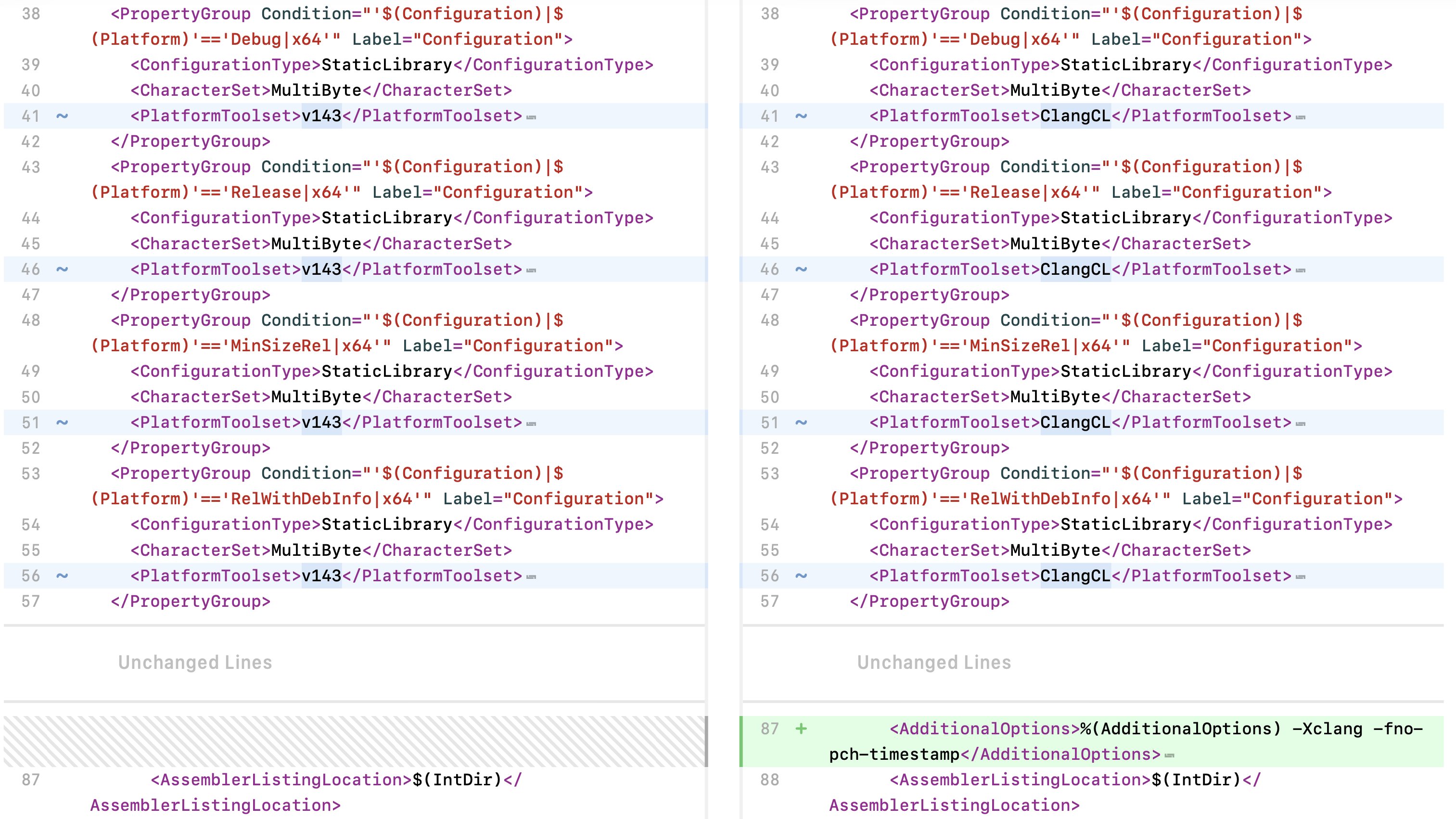
but that is to be expected, I reckon, and what’s important is that CLToolExe and CLToolPath properties have the correct values.
However, trying to build this configuration will fail:
> cmake --build . --target install --config Release -- /m

  Building Custom Rule E:/path/to/project/CMakeLists.txt
E:\tools\vs\vs2022\MSBuild\Microsoft\VC\v170\Microsoft.Cpp.ClangCl.Common.targets(235,5): error : Building with "clang-cl.exe". [E:\path\to\project\build\thingy.vcxproj]
E:\tools\vs\vs2022\MSBuild\Microsoft\VC\v170\Microsoft.Cpp.ClangCl.Common.targets(235,5): error MSB6004: The specified task executable location "E:/path/to/project/build\clang-cl.exe" is invalid. [E:\path\to\project\build\thingy.vcxproj]
From that output I gather that this time MSBuild(?) ignored(?) the CLToolExe value from *.vcxproj, while still respecting the CLToolPath property from the same file, and that results in an invalid path E:/path/to/project/build\clang-cl.exe (with a wrong slash?), where E:/path/to/project/build is a correct value from the CLToolPath property, but clang-cl.exe is a wrong value, because instead there should be launch-cl.cmd value here from the CLToolExe property, shouldn’t it.
So far it looks like there is something wrong with MSBuild(?), as CMake generates a correct(?) project file, which does work fine without -T ClangCL, so it’s MSBuild who ignores CLToolExe property with this particular toolset and instead uses a hardcoded (somewhere?) clang-cl.exe value.
For now I’ve managed to find a workaround which is to simply provide /p:CLToolExe inline, and then MSBuild will finally respect it, and the build will go fine:
> cmake --build . --target install --config Release -- /m /p:CLToolExe=launch-cl.cmd
Theoretically, one would also provide /p:CLToolPath=e:/path/to/project/build, but it is already present in *.vcxproj, and MSBuild does not ignore that one (for some reason).
I get the same results no matter what shell is used: it can be “plain” cmd, Git BASH or that special Visual Studio Developer Command Prompt / Developer PowerShell environment - makes no difference. So unless I have missed some more configuration parameters, this looks like a bug in MSBuild, because what else can CMake do to make it respect the CLToolExe property in the generated *.vcxproj file (so one would not need to “enforce” it via inline CLI override)? And once again, it all works fine with the “default” toolset (so without -T ClangCL).
If anything, I mostly use Ninja generator, so normally I wouldn’t care about something not working with VS generators, but unfortunately I do need to make this work with VS generators too.