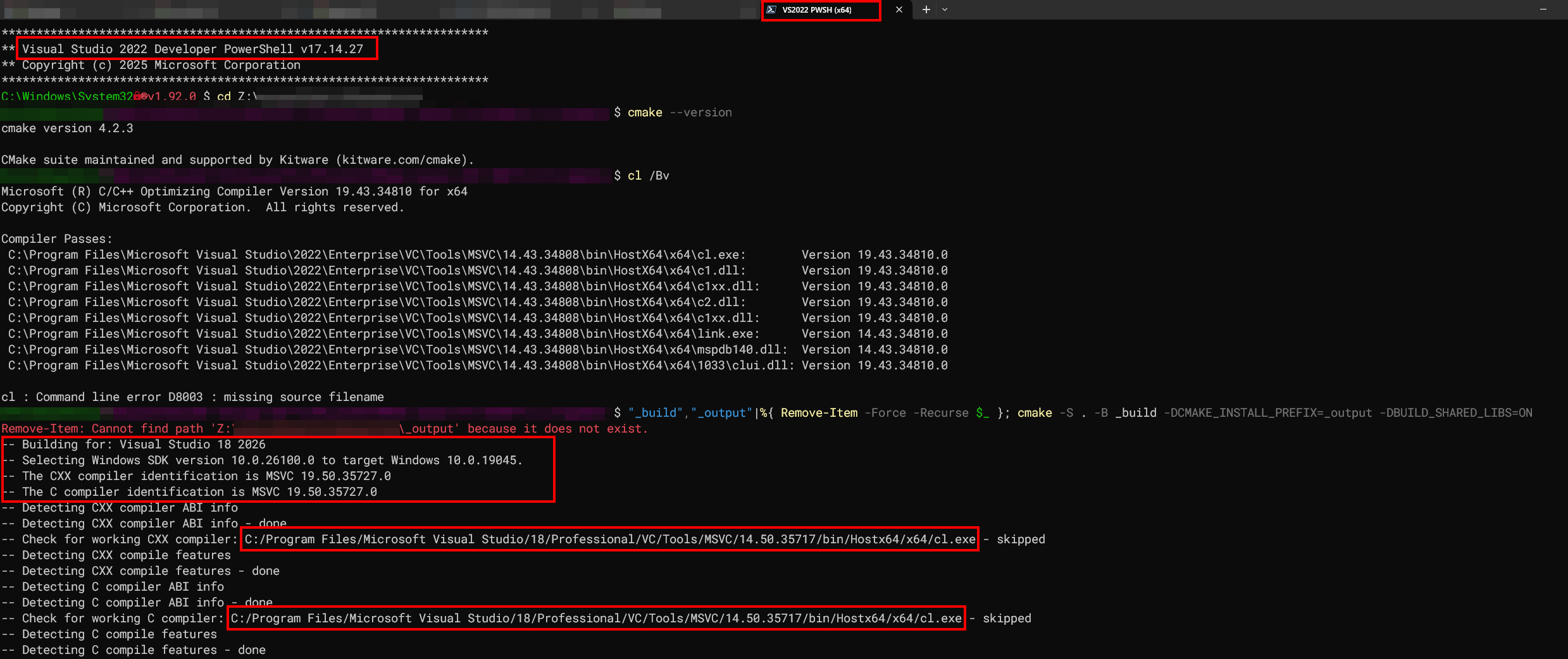
Was our original premise wrong and it doesn’t actually pick it from the environment even though it’s readily available there? I am fairly certain this used to work at some point.
Thanks for any insights.
PS: the installed CMake is the latest one as per WinGet, which is why it’s this one and not 4.3.0.
My experience has been that CMake always picks the newest version of VS installed that it can detect. If you want a specific version of VS you specify it explicitly in the generator.
Something else you may want to keep in mind when using different Visual Studio environments is that you may want to use specific versions of the Windows SDK. I currently set that using the CMAKE_SYSTEM_VERSION variable:
cmake -G "Visual Studio 18 2026" -DCMAKE_SYSTEM_VERSION=10.0.26100.0
or
cmake -G "Visual Studio 17 2022" -DCMAKE_SYSTEM_VERSION=10.0.19041.0
Also it will use the newest version the specific version of CMake knows about. So if you have an old enough version, that’d be VS2022 getting picked albeit VS2026 may be installed, whereas if you have the most recent version and you always relied on the (unstable!) default generator, the two facts that you installed VS2026 and updated to a version knowing about VS2026 is enough to switch over to VS2026.