# How to write a proper configurePreset using MinGW compilers with "MinGW Makefiles" generator?
**URL:** https://discourse.cmake.org/t/how-to-write-a-proper-configurepreset-using-mingw-compilers-with-mingw-makefiles-generator/6615
**Category:** Code
**Tags:** os:windows
**Created:** [October 6, 2022, 4:13am UTC](https://discourse.cmake.org/t/how-to-write-a-proper-configurepreset-using-mingw-compilers-with-mingw-makefiles-generator/6615 "2022-10-06T04:13:39Z")
**Posts on this page:** 5
**Page:** 1
### Author:  [@hwhsu1231](https://discourse.cmake.org/u/hwhsu1231)
#### Post date: [October 6, 2022, 4:13am UTC](https://discourse.cmake.org/t/how-to-write-a-proper-configurepreset-using-mingw-compilers-with-mingw-makefiles-generator/6615/1 "2022-10-06T04:13:40Z")
## Problem Descriptions
First of all, I already installed MinGW64 compiler in MSYS with running the following command:
```bash
pacman -S mingw-w64-x86_64-toolchain
```
And I tried the following example of `CMakePresets.json`:
> **Click to expand**
>
> ```json
> {
> "version": 5,
> "configurePresets": [
> {
> "name": "win32-gcc-x64-mingw-debug",
> "displayName": "Windows GCC x64 (MinGW Makefiles) Debug",
> "description": "Using GCC x64 compiler with \"MinGW Makefiles\" geneartor on Windows - Debug",
> "generator": "MinGW Makefiles",
> "binaryDir": "${sourceDir}/build/${presetName}",
> "installDir": "${sourceDir}/install/${presetName}",
> "cacheVariables": {
> "CMAKE_C_COMPILER": "C:/msys64/mingw64/bin/gcc.exe",
> "CMAKE_CXX_COMPILER": "C:/msys64/mingw64/bin/g++.exe",
> "CMAKE_MAKE_PROGRAM": "C:/msys64/mingw64/bin/mingw32-make.exe",
> "CMAKE_BUILD_TYPE": "Debug"
> }
> }
> ],
> "buildPresets": [
> {
> "name": "win32-gcc-x64-mingw-debug",
> "displayName": "Windows GCC x64 (MinGW Makefiles) Debug",
> "configurePreset": "win32-gcc-x64-mingw-debug"
> }
> ]
> }
>
> ```
However, it failed with the following error message:
> **Click to expand**
>
> ```cmd
> F:\Git-Repo\cmake-project-template-conan>cmake --preset win32-gcc-x64-mingw-debug
> Preset CMake variables:
>
> CMAKE_BUILD_TYPE="Debug"
> CMAKE_CXX_COMPILER="C:/msys64/mingw64/bin/g++.exe"
> CMAKE_C_COMPILER="C:/msys64/mingw64/bin/gcc.exe"
> CMAKE_INSTALL_PREFIX:PATH="F:/Git-Repo/cmake-project-template-conan/install/win32-gcc-x64-mingw-debug"
> CMAKE_MAKE_PROGRAM="C:/msys64/mingw64/bin/mingw32-make.exe"
>
> -- The C compiler identification is unknown
> -- The CXX compiler identification is unknown
> -- Detecting C compiler ABI info
> -- Detecting C compiler ABI info - failed
> -- Check for working C compiler: C:/msys64/mingw64/bin/gcc.exe
> -- Check for working C compiler: C:/msys64/mingw64/bin/gcc.exe - broken
> CMake Error at C:/Program Files/CMake/share/cmake-3.24/Modules/CMakeTestCCompiler.cmake:69 (message):
> The C compiler
>
> "C:/msys64/mingw64/bin/gcc.exe"
>
> is not able to compile a simple test program.
>
> It fails with the following output:
>
> Change Dir: F:/Git-Repo/cmake-project-template-conan/build/win32-gcc-x64-mingw-debug/CMakeFiles/CMakeTmp
>
> Run Build Command(s):C:/msys64/mingw64/bin/mingw32-make.exe -f Makefile cmTC_5af10/fast && C:/msys64/mingw64/bin/mingw32-make.exe -f CMakeFiles\cmTC_5af10.dir\build.make CMakeFiles/cmTC_5af10.dir/build
> mingw32-make[1]: Entering directory 'F:/Git-Repo/cmake-project-template-conan/build/win32-gcc-x64-mingw-debug/CMakeFiles/CMakeTmp'
> Building C object CMakeFiles/cmTC_5af10.dir/testCCompiler.c.obj
> C:\msys64\mingw64\bin\gcc.exe -o CMakeFiles\cmTC_5af10.dir\testCCompiler.c.obj -c F:\Git-Repo\cmake-project-template-conan\build\win32-gcc-x64-mingw-debug\CMakeFiles\CMakeTmp\testCCompiler.c
> mingw32-make[1]: *** [CMakeFiles\cmTC_5af10.dir\build.make:77: CMakeFiles/cmTC_5af10.dir/testCCompiler.c.obj] Error 1
> mingw32-make[1]: Leaving directory 'F:/Git-Repo/cmake-project-template-conan/build/win32-gcc-x64-mingw-debug/CMakeFiles/CMakeTmp'
> mingw32-make: *** [Makefile:126: cmTC_5af10/fast] Error 2
>
> CMake will not be able to correctly generate this project.
> Call Stack (most recent call first):
> CMakeLists.txt:3 (project)
>
> -- Configuring incomplete, errors occurred!
> See also "F:/Git-Repo/cmake-project-template-conan/build/win32-gcc-x64-mingw-debug/CMakeFiles/CMakeOutput.log".
> See also "F:/Git-Repo/cmake-project-template-conan/build/win32-gcc-x64-mingw-debug/CMakeFiles/CMakeError.log".
>
> ```
Here are the generated `CMakeOutput.log` and `CMakeError.log`:
- [CMakeOutput.log](https://discourse.cmake.org/uploads/e14faf630b9ae979c5e65912d962df69/CMakeOutput.log)
- [CMakeError.log](https://discourse.cmake.org/uploads/ca81d510ede9d32df8694a550eb859f3/CMakeError.log)
What do I miss? If the above example is not appropriate, can someone give me a successful example? or how to fix it?
## Environments and Versions
- OS version: **Windows 11**
- Compiler version: **GCC 12.2.0**
- CMake version: **CMake 3.24.2**
---
### Author:  [@brad.king](https://discourse.cmake.org/u/brad.king)
#### Post date: [October 6, 2022, 2:43pm UTC](https://discourse.cmake.org/t/how-to-write-a-proper-configurepreset-using-mingw-compilers-with-mingw-makefiles-generator/6615/2 "2022-10-06T14:43:16Z")
> – The C compiler identification is unknown
> … is not able to compile a simple test program.
It looks like the `gcc` binary is immediately exiting with an error code but no message. Please try running `C:/msys64/mingw64/bin/gcc.exe` from the same environment in which you’re trying to use the preset. I suspect that the compiler’s runtime dependencies are not in the `PATH`.
---
### Author:  [@hwhsu1231](https://discourse.cmake.org/u/hwhsu1231)
#### Post date: [October 6, 2022, 3:32pm UTC](https://discourse.cmake.org/t/how-to-write-a-proper-configurepreset-using-mingw-compilers-with-mingw-makefiles-generator/6615/3 "2022-10-06T15:32:15Z")
> I suspect that the compiler’s runtime dependencies are not in the `PATH` .
Yes! I think this is the problem. And I found a solution.
First of all, I didn’t add the directory `C:/msys64/mingw64/bin` into the `PATH` because I tend to call `msys2_shell.cmd` to open a new terminal with the corresponding environment when I want to use MinGW. Therefore, I **APPEND** the directory `C:/msys64/mingw64/bin` to the `PATH` in `CMakePresets.json`. And it **WORKS**.
The following is the modified example of `CMakePresets.json`.
> **Click to expand**
>
> ```json
> {
> "version": 5,
> "configurePresets": [
> {
> "name": "win32-gcc-x64-mingw-debug",
> "displayName": "Windows GCC x64 (MinGW Makefiles) Debug",
> "description": "Using GCC x64 compiler with \"MinGW Makefiles\" geneartor on Windows - Debug",
> "generator": "MinGW Makefiles",
> "binaryDir": "${sourceDir}/build/${presetName}",
> "installDir": "${sourceDir}/install/${presetName}",
> "environment": {
> "PATH": "C:/msys64/mingw64/bin;$penv{PATH}"
> },
> "cacheVariables": {
> "CMAKE_C_COMPILER": "gcc.exe",
> "CMAKE_CXX_COMPILER": "g++.exe",
> "CMAKE_BUILD_TYPE": "Debug"
> }
> }
> ],
> "buildPresets": [
> {
> "name": "win32-gcc-x64-mingw-debug",
> "displayName": "Windows GCC x64 (MinGW Makefiles) Debug",
> "configurePreset": "win32-gcc-x64-mingw-debug"
> }
> ]
> }
>
> ```
And the following is the log of DEMO:
> **Click to expand**
>
> ```cmd
> F:\Git-Repo\cmake-project-template-conan>cmake --preset win32-gcc-x64-mingw-debug
> Preset CMake variables:
>
> CMAKE_BUILD_TYPE="Debug"
> CMAKE_CXX_COMPILER="g++.exe"
> CMAKE_C_COMPILER="gcc.exe"
> CMAKE_INSTALL_PREFIX:PATH="F:/Git-Repo/cmake-project-template-conan/install/win32-gcc-x64-mingw-debug"
>
> Preset environment variables:
>
> PATH="C:/msys64/mingw64/bin;C:\Python\Python310\Scripts\;C:\Python\Python310\;C:\Program Files\Eclipse Foundation\jdk-8.0.302.8-hotspot\bin;C:\Windows\system32;C:\Windows;C:\Windows\System32\Wbem;C:\Windows\System32\WindowsPowerShell\v1.0\;C:\Windows\System32\OpenSSH\;C:\Program Files\Microsoft VS Code\bin;C:\Program Files\dotnet\;C:\Program Files\CMake\bin;C:\Program Files\Intel\WiFi\bin\;C:\Program Files\Common Files\Intel\WirelessCommon\;C:\Program Files (x86)\gsudo\;C:\Program Files\NASM;C:\Program Files\Git\cmd;C:\Program Files\Typora;C:\WINDOWS\system32;C:\WINDOWS;C:\WINDOWS\System32\Wbem;C:\WINDOWS\System32\WindowsPowerShell\v1.0\;C:\WINDOWS\System32\OpenSSH\;C:\Program Files (x86)\Microsoft Visual Studio\2019\Community\VC\Auxiliary\Build;C:\Users\hwhsu1231\AppData\Local\Microsoft\WindowsApps;C:\Users\hwhsu1231\.dotnet\tools"
>
> -- The C compiler identification is GNU 12.2.0
> -- The CXX compiler identification is GNU 12.2.0
> -- Detecting C compiler ABI info
> -- Detecting C compiler ABI info - done
> -- Check for working C compiler: C:/msys64/mingw64/bin/gcc.exe - skipped
> -- Detecting C compile features
> -- Detecting C compile features - done
> -- Detecting CXX compiler ABI info
> -- Detecting CXX compiler ABI info - done
> -- Check for working CXX compiler: C:/msys64/mingw64/bin/g++.exe - skipped
> -- Detecting CXX compile features
> -- Detecting CXX compile features - done
> ========== cmake-project-template-conan ==========
> -- Configuring done
> -- Generating done
> -- Build files have been written to: F:/Git-Repo/cmake-project-template-conan/build/win32-gcc-x64-mingw-debug
>
> ```
---
### Author:  [@hwhsu1231](https://discourse.cmake.org/u/hwhsu1231)
#### Post date: [October 6, 2022, 3:54pm UTC](https://discourse.cmake.org/t/how-to-write-a-proper-configurepreset-using-mingw-compilers-with-mingw-makefiles-generator/6615/4 "2022-10-06T15:54:55Z")
@brad.king
There is another problem confusing me, which is **“the difference between `$penv{}` and `$env{}`”**.
I found that if I use `$env{PATH}` instead of `$penv{PATH}` in the above example, which is:
```json
"environment": {
"PATH": "C:/msys64/mingw64/bin;$env{PATH}"
},
```
Then, there will be an error message about **“Invalid macro expansion”** when I run `cmake --preset` command.
```nohighlight
F:\Git-Repo\cmake-project-template-conan>cmake --preset win32-gcc-x64-mingw-debug
CMake Error: Could not read presets from F:/Git-Repo/cmake-project-template-conan: Invalid macro expansion
```
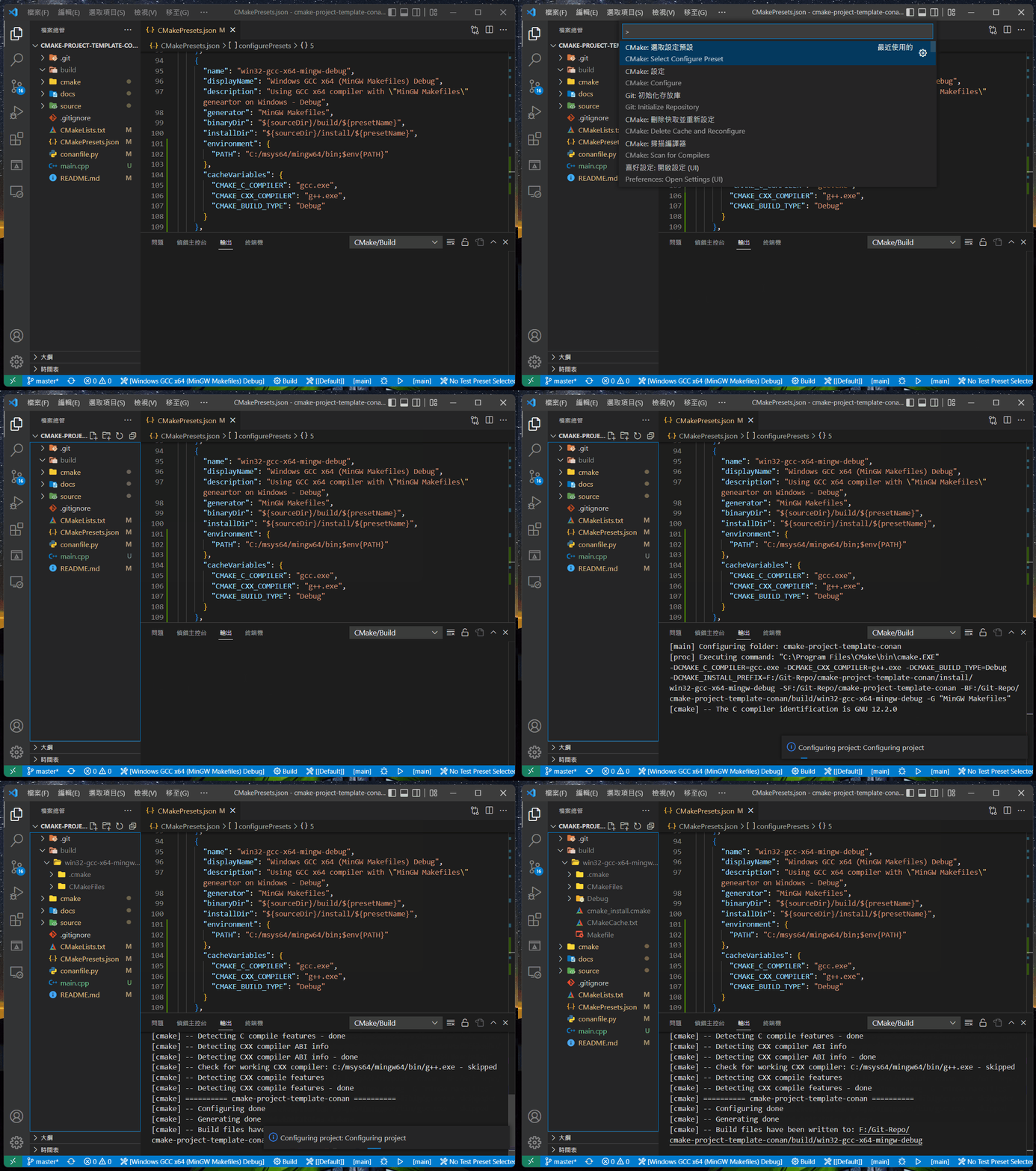
**HOWEVER** , it can still work when I use VSCode with CMake-Tools plugin to configure the project. **WHY??**
The following is the DEMO GIF:
---
### Author:  [@kyle.edwards](https://discourse.cmake.org/u/kyle.edwards)
#### Post date: [October 7, 2022, 1:54pm UTC](https://discourse.cmake.org/t/how-to-write-a-proper-configurepreset-using-mingw-compilers-with-mingw-makefiles-generator/6615/5 "2022-10-07T13:54:02Z")
The `$env{...}` macro is supposed to reference other environment variables within the `environment` map, or the environment inherited from the parent process if the corresponding variable doesn’t exist. The problem is that if `PATH` contains `$env{PATH}`, then it’s referencing itself, creating a circular dependency. The purpose of `$penv{...}` is to break this cycle by only using the environment inherited from the parent process. If `"PATH": "$env{PATH}"` works in VSCode then it sounds like they didn’t implement their preset support properly.