# How to create different filters for the same files in different projects?
**URL:** https://discourse.cmake.org/t/how-to-create-different-filters-for-the-same-files-in-different-projects/6360
**Category:** Code
**Created:** [August 27, 2022, 1:57pm UTC](https://discourse.cmake.org/t/how-to-create-different-filters-for-the-same-files-in-different-projects/6360 "2022-08-27T13:57:26Z")
**Posts on this page:** 3
**Page:** 1
### Author:  [@Kulagin](https://discourse.cmake.org/u/Kulagin)
#### Post date: [August 27, 2022, 1:57pm UTC](https://discourse.cmake.org/t/how-to-create-different-filters-for-the-same-files-in-different-projects/6360/1 "2022-08-27T13:57:26Z")
Solution to quickly reproduce the problem:
> **[CMake Subdirectories Filters Example.zip](https://www.dropbox.com/s/4cmnzs5zvu6wt3h/CMake%20Subdirectories%20Filters%20Example.zip?dl=0)**
>
> Shared with Dropbox
I have this file structure:
```auto
My Solution(dir)
+-- CMakeLists.txt
+-- MainProject(dir)
+-- File1.cpp
+-- File1.h
+-- File2.cpp
+-- File2.h
+-- Subdirectory(dir)
+-- File1.cpp
+-- File1.h
+-- File2.cpp
+-- File2.h
+-- TestMainProject(dir)
+-- TestFile1.cpp
+-- TestFile2.cpp
+-- Subdirectory(dir)
+-- TestFile1.cpp
+-- TestFile2.cpp
```
For the `MainProject` I’d like to include all files from the `MainProject` folder with filters following the folder structure.
For the `TestMainProject` I’d like to include all files from the `MainProject` folder with filters following the folder structure but also put all these files under the `MainProject` filter. Same for the `TestMainProject` directory: put all files under the `TestMainProject` filter and follow the folder structure.
So I wrote this code:
```auto
cmake_minimum_required(VERSION 3.10)
project("CMake Subdirectories Filters Example")
set(main_project_name "MainProject")
set(main_project_path "${PROJECT_SOURCE_DIR}/${main_project_name}")
file(GLOB_RECURSE main_project_files "${main_project_path}/*.h" "${main_project_path}/*.cpp")
add_executable(${main_project_name} ${main_project_files})
source_group(TREE "${main_project_path}/" FILES ${main_project_files})
function(group_source_files_into_filter_with_folder_structure files_list project_path filter_to_put_into)
foreach(file_path IN LISTS files_list)
get_filename_component(file_directory_path "${file_path}" DIRECTORY)
string(REPLACE ${project_path} ${filter_to_put_into} file_path_msvc_relative "${file_directory_path}")
string(REPLACE "/" "\\" source_path_msvc "${file_path_msvc_relative}")
source_group("${source_path_msvc}" FILES "${file_path}")
endforeach()
endfunction()
set(test_main_project_name "TestMainProject")
set(test_main_project_path "${PROJECT_SOURCE_DIR}/${test_main_project_name}")
file(GLOB_RECURSE test_main_project_files "${test_main_project_path}/*.h" "${test_main_project_path}/*.cpp")
add_executable(${test_main_project_name} ${main_project_files} ${test_main_project_files})
group_source_files_into_filter_with_folder_structure("${main_project_files}" "${main_project_path}" "${main_project_name}")
group_source_files_into_filter_with_folder_structure("${test_main_project_files}" "${test_main_project_path}" "${test_main_project_name}")
```
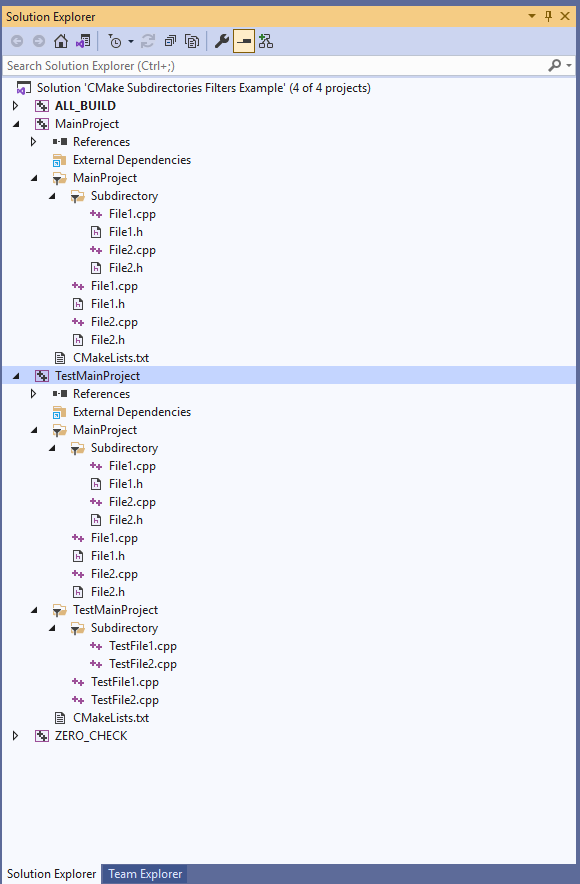
It almost does the job:
[ ](https://i.imgur.com/CVs03FP.png)
It does create filters as I want it to for the `TestMainProject`: it creates the additional `TestMainProject` filter for the `TestMainProject` folder and additional `MainProject` filter for the `MainProject` folder.
The problem is that it also creates additional `MainProject` filter in the `MainProject` project, which isn’t what I’d like it to do.
Here’s what I’d like to achieve:
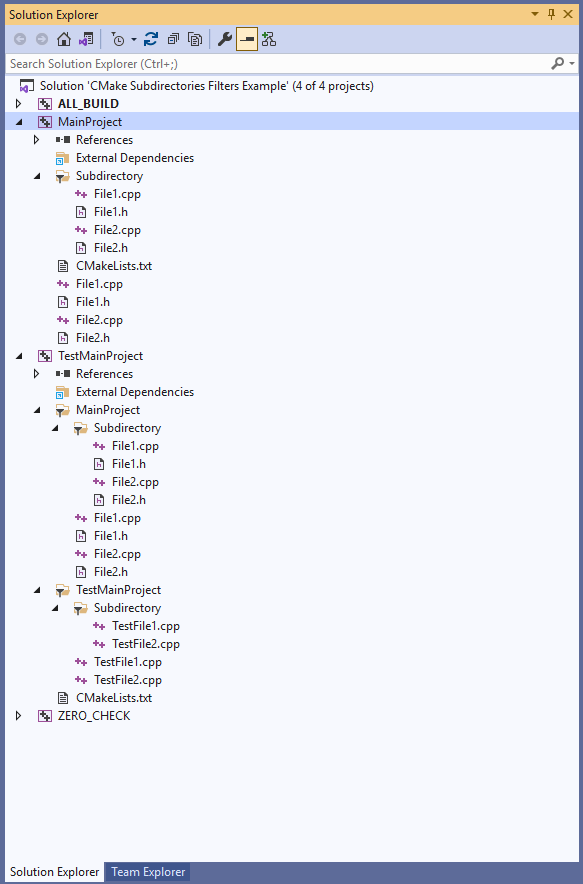
See how there is no `MainProject` filter inside the `MainProject` project but inside the `TestMainProject` there are filters for `MainProject` and `TestMainProject` folders.
Is there a way to do what I would like to do? Feels like I hit a limit of CMake and there’s no way because, apparently, source\_group is global and it creates the group for the files for all projects.
---
### Author:  [@McMartin](https://discourse.cmake.org/u/McMartin)
#### Post date: [August 28, 2022, 9:50am UTC](https://discourse.cmake.org/t/how-to-create-different-filters-for-the-same-files-in-different-projects/6360/3 "2022-08-28T09:50:16Z")
`source_group` is not global. From [https://cmake.org/cmake/help/latest/command/source\_group.html](https://cmake.org/cmake/help/latest/command/source_group.html)
> The group is scoped in the directory where the command is called, and applies to sources in targets created in that directory.
So you may get the behavior that you want by creating `MainProject` and `TestMainProject` in subfolders.
---
### Author:  [@Kulagin](https://discourse.cmake.org/u/Kulagin)
#### Post date: [August 28, 2022, 11:59am UTC](https://discourse.cmake.org/t/how-to-create-different-filters-for-the-same-files-in-different-projects/6360/4 "2022-08-28T11:59:44Z")
> `source_group` is not global. From [https://cmake.org/cmake/help/latest/command/source\_group.html](https://cmake.org/cmake/help/latest/command/source_group.html)
> The group is scoped in the directory where the command is called, and applies to sources in targets created in that directory.
> So you may get the behavior that you want by creating `MainProject` and `TestMainProject` in subfolders.
Thanks, at first I didn’t understand, but I got it now. I put CMakeLists.txt in sub-folders and got this in the end:
CMakeLists.txt in the root directory:
```auto
cmake_minimum_required(VERSION 3.10)
project("CMake Subdirectories Filters Example")
set(main_project_name "MainProject")
set(main_project_path "${PROJECT_SOURCE_DIR}/${main_project_name}")
file(GLOB_RECURSE main_project_files "${main_project_path}/*.h" "${main_project_path}/*.cpp")
add_subdirectory(MainProject)
add_subdirectory(TestMainProject)
```
CMakeLists.txt in the `MainProject` folder:
```auto
cmake_minimum_required(VERSION 3.10)
add_executable(${main_project_name} ${main_project_files})
source_group(TREE "${main_project_path}/" FILES ${main_project_files})
```
CMakeLists.txt in the `TestMainProject` folder:
```auto
cmake_minimum_required(VERSION 3.10)
set(test_main_project_name "TestMainProject")
set(test_main_project_path "${PROJECT_SOURCE_DIR}/${test_main_project_name}")
file(GLOB_RECURSE test_main_project_files "${test_main_project_path}/*.h" "${test_main_project_path}/*.cpp")
add_executable(${test_main_project_name} ${main_project_files} ${test_main_project_files})
source_group(TREE "${main_project_path}/" PREFIX "${main_project_name}" FILES ${main_project_files})
source_group(TREE "${test_main_project_path}/" PREFIX "${test_main_project_name}" FILES ${test_main_project_files})
```
Now it generates the correct filters.