# Generator for Eclipse CDT4 Unix Makefiles - Error
**URL:** https://discourse.cmake.org/t/generator-for-eclipse-cdt4-unix-makefiles-error/966
**Category:** Usage
**Created:** [April 9, 2020, 9:36pm UTC](https://discourse.cmake.org/t/generator-for-eclipse-cdt4-unix-makefiles-error/966 "2020-04-09T21:36:11Z")
**Posts on this page:** 10
**Page:** 1
### Author:  [@Garry\_Anderson](https://discourse.cmake.org/u/Garry_Anderson)
#### Post date: [April 9, 2020, 9:36pm UTC](https://discourse.cmake.org/t/generator-for-eclipse-cdt4-unix-makefiles-error/966/1 "2020-04-09T21:36:11Z")
CMake Commuinity & Guru Support Group:
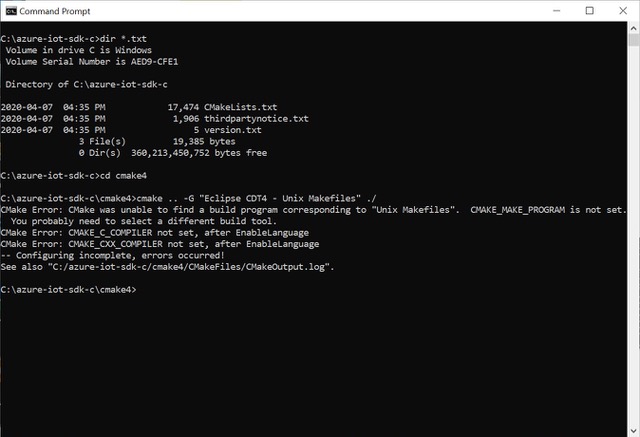
I am using command line for cmake -G “Eclipse CDT4 - Unix Makefiles” to generate makefiles (from CMake tree) to be imported into Eclipse environment, but it looks like your Cmake Generator has a bug because it gives error “CMAKE\_MAKE\_PROGRAM not set”.
How do I get rid of this bug? See the attached image.
Thanks,
Garry.
---
### Author:  [@McMartin](https://discourse.cmake.org/u/McMartin)
#### Post date: [April 9, 2020, 9:47pm UTC](https://discourse.cmake.org/t/generator-for-eclipse-cdt4-unix-makefiles-error/966/2 "2020-04-09T21:47:43Z")
“Eclipse CDT4 - Unix Makefiles” is one of many CMake generators that wrap the “Unix Makefiles” generator with an “extra” generator (“Eclipse CDT4” in this case).
Please make sure that you can use the “Unix Makefiles” generator first. It needs `make` to be installed and able to run.
---
### Author:  [@Garry\_Anderson](https://discourse.cmake.org/u/Garry_Anderson)
#### Post date: [April 9, 2020, 10:00pm UTC](https://discourse.cmake.org/t/generator-for-eclipse-cdt4-unix-makefiles-error/966/3 "2020-04-09T22:00:50Z")
Alain:
Thanks for those hints. I will try it next, and let you know what I find.
Garry.
---
### Author:  [@Garry\_Anderson](https://discourse.cmake.org/u/Garry_Anderson)
#### Post date: [April 13, 2020, 6:29am UTC](https://discourse.cmake.org/t/generator-for-eclipse-cdt4-unix-makefiles-error/966/4 "2020-04-13T06:29:40Z")
Alain:
I have made some more tests, but I cannot solve this problem. Still have the gcc error with my simple main.c program. Maybe something is wrong in Environment Variables - don’t know.
I have zipped all the latest files for you to download from here:
```
TestCode.zip (1.2 MB) => [https://files.secureserver.net/0sc7BXRQnDTJIf](https://files.secureserver.net/0sc7BXRQnDTJIf)
```
If you have any more ideas how to fix the gcc.exe broken error, please let me know.
Garry.
---
### Author:  [@McMartin](https://discourse.cmake.org/u/McMartin)
#### Post date: [April 13, 2020, 9:59am UTC](https://discourse.cmake.org/t/generator-for-eclipse-cdt4-unix-makefiles-error/966/5 "2020-04-13T09:59:03Z")
I can see two main issues.
**First issue** : the script `gen.bat` contains some unbalanced quoting.
It contains:
```auto
-DCMAKE_CXX_COMPILER=g++.exe" -DCMAKE_C_COMPILER=gcc.exe"
```
which is equivalent to
```auto
-DCMAKE_CXX_COMPILER="g++.exe -DCMAKE_C_COMPILER=gcc.exe"
```
This makes `cmake` try to run `g++.exe -DCMAKE_C_COMPILER=gcc.exe`, which fails (see `TestCode/cmake/CMakeFiles/CMakeError.log`).
**Second issue** : `make` is maybe not installed.
What exactly is installed in `C:\MinGW`?
The picture “CMake TestCode Setup.jpg” shows that both `gcc` and `g++` are in the `PATH`, but this doesn’t guarantee that `make` is installed and can be run. You can use `where cmake` to check whether `make` can be found.
If all of `make`, `gcc` and `g++` are in the `PATH`, there is no need to pass any `-DCMAKE_*` argument on the command line. `cmake` will find them.
---
### Author:  [@Garry\_Anderson](https://discourse.cmake.org/u/Garry_Anderson)
#### Post date: [April 14, 2020, 12:18am UTC](https://discourse.cmake.org/t/generator-for-eclipse-cdt4-unix-makefiles-error/966/6 "2020-04-14T00:18:38Z")
Hi Alain:
Thanks for your clues. I have been working through some things.
I have cleaned up the Gen.bat file, and cleaned up some Path issues. Here is the link to download the ZIP file:
```
TestCMake.zip (111.2 MB) => [https://files.secureserver.net/0sxKch2g3jiTbY](https://files.secureserver.net/0sxKch2g3jiTbY)
```
Now, you can see my “CMake\_Errors\_Where\_FInds.jpg" image to see where the EXE files are found
Also, from root directory I can run each of cmake, gcc, g++, and make, but the last one shows no console output. I also tried “make /?” but got no console output, just immediate return to C: \> prompt. I don’t think this looks good. Do you have any idea why there is no console output from any “make” command? Other bad commands such as foo, reply with " ‘foo’ is not recognized as an internal or external command"
You asked what is in C:\MinGW directory, so I zipped it up for you. I comes from a fresh install a few days ago.
Thank you very much for your assistance.
Garry.
---
### Author:  [@McMartin](https://discourse.cmake.org/u/McMartin)
#### Post date: [April 14, 2020, 8:05pm UTC](https://discourse.cmake.org/t/generator-for-eclipse-cdt4-unix-makefiles-error/966/7 "2020-04-14T20:05:46Z")
AFAIK, there is no `make.exe` that comes with CMake, so `C:\Program File\CMake\bin\make.exe` should not exist. That would explain why this `make.exe` seems to be broken.
It seems that you used `mingw-get` to install what is in `C:\MinGW`. Based on the contents of `C:\MinGW\var\cache\mingw-get\packages\`, you didn’t install the package for `make`. Once that package installed, you should have `C:\MinGW\bin\make.exe`, and you can do `make.exe --help` to verify that it can run.
---
### Author:  [@Garry\_Anderson](https://discourse.cmake.org/u/Garry_Anderson)
#### Post date: [April 15, 2020, 4:39am UTC](https://discourse.cmake.org/t/generator-for-eclipse-cdt4-unix-makefiles-error/966/8 "2020-04-15T04:39:59Z")
Hi Alain:
Thanks for your hints. Here is a quick status update:
I removed make.exe per your first observation, which was correct.
I checked my MinGW installation, and the make.exe was missing, so I fixed that so that make.exe was now accessible.
I tested this MinGW (small 71K) make.exe and still get no response on dialog box.
I found another make file called MinGW-make.exe (251K size) and that program does give terminal response.
It looks like the smaller make.exe does not have the results.
I temporarliy renamed small make.exe to something else, and made a copy of large MinGW-make.exe, then renamed as make.exe
This larger make.exe respsonds correctly, but I still have the same failure when gcc.exe does not compile test file.
I download GNU tools and tried that makefile, with no improvement.
Do you think the gcc.exe that came with MinGW might have been minimalized too much and thus gives the error?
Tomorrow, I think I need to find another gcc.exe program, perhaps from the GNU tools.
Thanks for your suggestions.
Garry.
---
### Author:  [@Garry\_Anderson](https://discourse.cmake.org/u/Garry_Anderson)
#### Post date: [April 17, 2020, 2:25am UTC](https://discourse.cmake.org/t/generator-for-eclipse-cdt4-unix-makefiles-error/966/9 "2020-04-17T02:25:43Z")
Hi Alain:
I found and fixed the problem with this gcc.exe — broken error
First, I fixed all the path issues, and confirmed that MinGW files for gcc.exe, g++.exe, and make.exe were all okay and available via PATH.
Then by using a simple main.c file for testing, and using cmake -G “Unix Makefiles” to test the operation, I found that the cmake tries to run **make.exe** directly from:
```
C:\Program Files\Cmake folder
```
and since there was no **make.exe** in that particular folder, I copied the MinGW\bin\ **make.exe** file into that CMake sub-folder, makng a duplicate that is not found by the PATH. After putting a copy of **make.exe** into that particular CMake sub-fodler, then the Generate command worked.
So the gcc.exe —broken error was not specific enough to find the real issue, but I found the real cause.
Thanks again for all your help and encouragement.
Garry.
---
### Author:  [@Garry\_Anderson](https://discourse.cmake.org/u/Garry_Anderson)
#### Post date: [May 29, 2020, 10:26pm UTC](https://discourse.cmake.org/t/generator-for-eclipse-cdt4-unix-makefiles-error/966/10 "2020-05-29T22:26:37Z")
Hi Alain:
Thanks for your previous help with these matters.
I have made some progress, but now I have another problem to solve.
I have partial success in generating Unix Makefiles from CMakeLists.txt by using CMake, but a couple of folders were “exported as global variables” but I have no clue where to find those exports. I cannot see any reference to those global variables in the “makefile" that was generated. The compile fails when it cannot find those INC folders.
Can you help me with this?
Original CMakeLists.txt statements (file attached), that seem to get lost in the Generation process from **cmake -G** command:
259 include\_directories(${MACRO\_UTILS\_INC\_FOLDER})
260 include\_directories(${UMOCK\_C\_INC\_FOLDER})
I don’t know how or where the Generated “makefile” gets these two directory links, because I am unable to find either of these “folders” in the makefile, and how to use them.
I did find an interesting comment in the attached **readme.md** file, as follows:
“The project will export a global variable MACRO\_UTILS\_INC\_FOLDER that points to the folder needed to be included so that `#include "azure_macro_utils/macro_utils.h"` resolves properly.”
… but does not say in which location this global variable may be found, nor how to include it into the “makefile” process.
Where are these so-called “global variables” recorded, and how do I get the Generated “makefile” to access these missing folders?
Sorry, but I am totally confused by this situation.
Any clues you can give will be helpful,
Thanks,
Garry.
[readme.md](https://discourse.cmake.org/uploads/short-url/oAmz96ijRYPVEN3OiWj1DYejk1e.md) (1.45 KB)
[CMakeLists.txt](https://discourse.cmake.org/uploads/short-url/uoY2drqaJJ9SKrlhy0ikveWD4tD.txt) (17.1 KB)