# find\_package method
**URL:** https://discourse.cmake.org/t/find-package-method/5346
**Category:** Usage
**Tags:** os:windows
**Created:** [March 31, 2022, 10:50am UTC](https://discourse.cmake.org/t/find-package-method/5346 "2022-03-31T10:50:51Z")
**Posts on this page:** 4
**Page:** 1
### Author:  [@alice](https://discourse.cmake.org/u/alice)
#### Post date: [March 31, 2022, 10:50am UTC](https://discourse.cmake.org/t/find-package-method/5346/1 "2022-03-31T10:50:51Z")
I build a opencv library and put it on `D:/TEST/opencv/release`
opencv structure like this
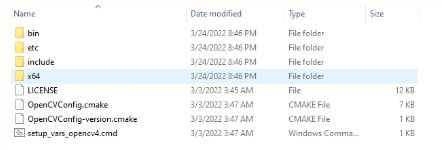
HOW TO build it successfully
method 1
On the cmakelist.txt
```auto
find_package(OpenCV REQUIRED PATHS "D:/TEST/opencv/release" NO_DEFAULT_PATH)
```
method 2
set windows environment path
On the cmakelist.txt
```auto
find_package(OpenCV REQUIRED)
```
Q:
method 3
visual studio 2019
How can I do with visual studio 2019 to set the path?
Q:
If I have many library,how can I manage the path?
Should I export them with windows env or hard code on cmakelist.
Do you have the suggest tool?
---
### Author:  [@ben.boeckel](https://discourse.cmake.org/u/ben.boeckel)
#### Post date: [March 31, 2022, 2:09pm UTC](https://discourse.cmake.org/t/find-package-method/5346/2 "2022-03-31T14:09:29Z")
It looks like it is already built. I presume you’re asking how to _use_ it.
Method 2 is what I’d recommend though munging with the environment is unnecessary; just set `OpenCV_DIR` in the UI or pass it on the command line. VS2019 shouldn’t be any different than anything else.
CMake doesn’t really provide much help for `PATH` itself. You can discover DLLs with `file(GET_RUNTIME_DEPENDENCIES)`, the `$` genex, or by crafting `PATH` as needed manually.
---
### Author:  [@alice](https://discourse.cmake.org/u/alice)
#### Post date: [March 31, 2022, 2:37pm UTC](https://discourse.cmake.org/t/find-package-method/5346/3 "2022-03-31T14:37:12Z")
> [@ben.boeckel](#):
>
> VS2019 shouldn’t be any different than anything else.
I already test it for some days.But I dont find any tutorial for cmake project to assign lib path. I always get the answer that you can use vcpkg.
If you know how to assign it with vs2019, thank you a lot.
---
### Author:  [@ben.boeckel](https://discourse.cmake.org/u/ben.boeckel)
#### Post date: [March 31, 2022, 2:48pm UTC](https://discourse.cmake.org/t/find-package-method/5346/4 "2022-03-31T14:48:38Z")
I think VS2019 probably has somewhere in its property panels to add `PATH` entries when using the `Run` menu, but I don’t use it enough to be of much guidance beyond that, sorry.