### Author:  [@hwhsu1231](https://discourse.cmake.org/u/hwhsu1231)
#### Post date: [October 10, 2022, 3:04pm UTC](https://discourse.cmake.org/t/failed-to-configure-preset-with-clang-llvm-compilers-when-using-cmake-tools/6637/1 "2022-10-10T15:04:35Z")
### Problem Description
First of all, I already installed Clang/LLVM by running the following [winget](https://github.com/microsoft/winget-cli) command:
```cmd
winget install LLVM.LLVM
```
And I tried with the following example of `CMakePresets.json`:
> **Click to expand**
>
> ```json
> {
> "version": 5,
> "configurePresets": [
> {
> "name": "win32-clang-x64-ninja-debug",
> "displayName": "Windows Clang x64 (Ninja) Debug",
> "description": "Using Clang x64 compiler with \"Ninja\" geneartor on Windows - Debug",
> "generator": "Ninja",
> "binaryDir": "${sourceDir}/build/${presetName}",
> "installDir": "${sourceDir}/install/${presetName}",
> "environment": {
> "PATH": "C:/Program Files/LLVM/bin;$penv{PATH}"
> },
> "cacheVariables": {
> "CMAKE_C_COMPILER": "clang.exe",
> "CMAKE_CXX_COMPILER": "clang++.exe",
> "CMAKE_BUILD_TYPE": "Debug"
> }
> }
> ]
> }
>
> ```
The strange thing is that it can **WORK** when I type the `cmake` command directly on the Terminal:
> **Click to expand**
>
> ```cmd
> F:\Git-Repo\cmake-conan-setup>cmake --preset win32-clang-x64-ninja-debug
> Preset CMake variables:
>
> CMAKE_BUILD_TYPE="Debug"
> CMAKE_CXX_COMPILER="clang++.exe"
> CMAKE_C_COMPILER="clang.exe"
> CMAKE_INSTALL_PREFIX:PATH="F:/Git-Repo/cmake-conan-setup/install/win32-clang-x64-ninja-debug"
>
> Preset environment variables:
>
> PATH="C:/Program Files/LLVM/bin;C:\Python\Python310\Scripts\;C:\Python\Python310\;C:\Program Files\Eclipse Foundation\jdk-8.0.302.8-hotspot\bin;C:\Windows\system32;C:\Windows;C:\Windows\System32\Wbem;C:\Windows\System32\WindowsPowerShell\v1.0\;C:\Windows\System32\OpenSSH\;C:\Program Files\Microsoft VS Code\bin;C:\Program Files\dotnet\;C:\Program Files\CMake\bin;C:\Program Files\Intel\WiFi\bin\;C:\Program Files\Common Files\Intel\WirelessCommon\;C:\Program Files (x86)\gsudo\;C:\Program Files\NASM;C:\Program Files\Git\cmd;C:\Program Files\Typora;C:\WINDOWS\system32;C:\WINDOWS;C:\WINDOWS\System32\Wbem;C:\WINDOWS\System32\WindowsPowerShell\v1.0\;C:\WINDOWS\System32\OpenSSH\;C:\Program Files (x86)\Microsoft Visual Studio\2019\Community\VC\Auxiliary\Build;C:\Users\hwhsu1231\AppData\Local\Microsoft\WindowsApps;C:\Users\hwhsu1231\.dotnet\tools;"
>
> -- The C compiler identification is Clang 15.0.2 with GNU-like command-line
> -- The CXX compiler identification is Clang 15.0.2 with GNU-like command-line
> -- Detecting C compiler ABI info
> -- Detecting C compiler ABI info - done
> -- Check for working C compiler: C:/Program Files/LLVM/bin/clang.exe - skipped
> -- Detecting C compile features
> -- Detecting C compile features - done
> -- Detecting CXX compiler ABI info
> -- Detecting CXX compiler ABI info - done
> -- Check for working CXX compiler: C:/Program Files/LLVM/bin/clang++.exe - skipped
> -- Detecting CXX compile features
> -- Detecting CXX compile features - done
> ========== cmake-conan-setup ==========
> -- Configuring done
> -- Generating done
> -- Build files have been written to: F:/Git-Repo/cmake-conan-setup/build/win32-clang-x64-ninja-debug
>
> ```
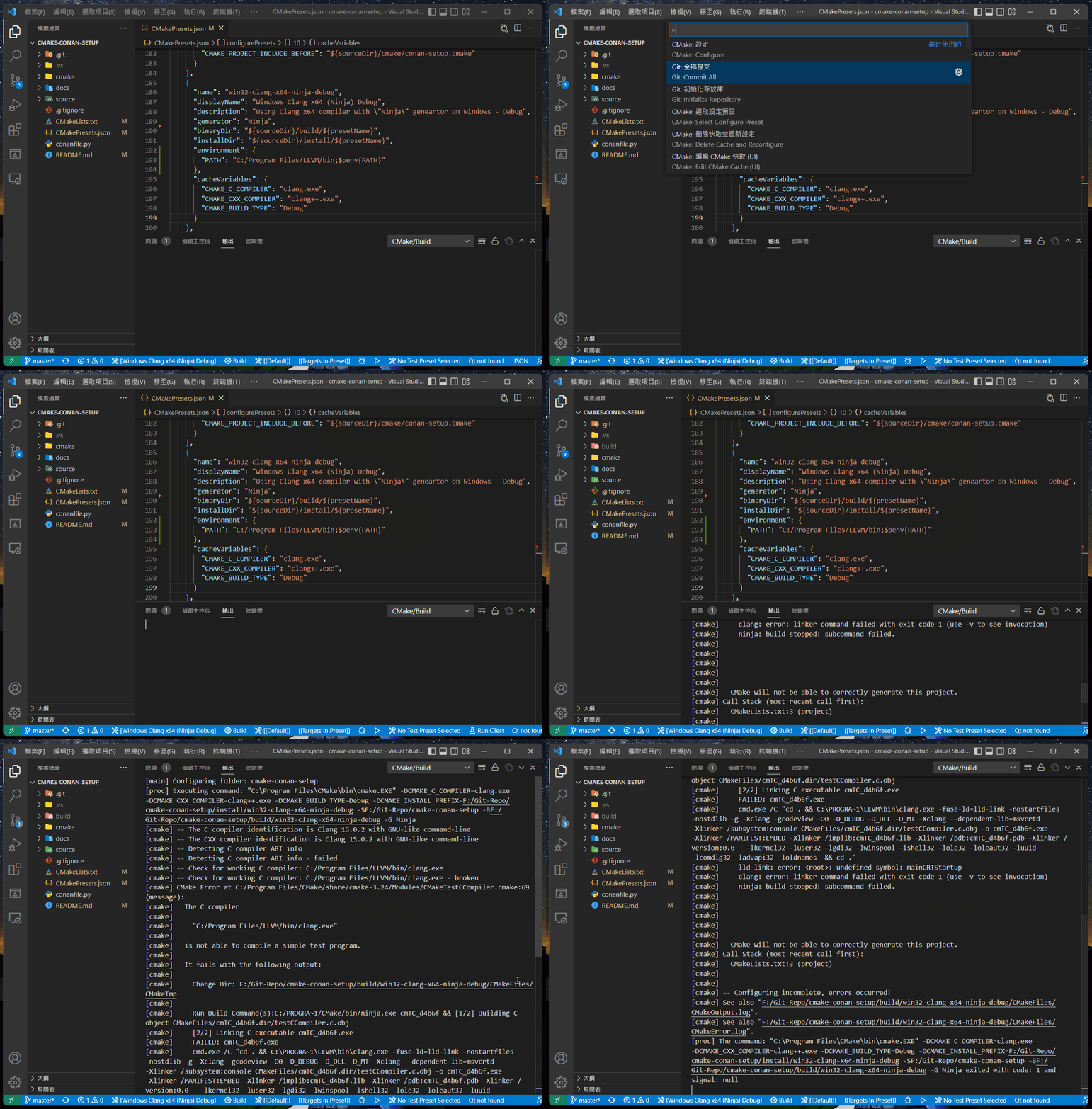
However, when I used VSCode + [CMake Tools](https://github.com/microsoft/vscode-cmake-tools) to do that, it **FAILED** with the following error message:
> **Click to expand**
>
> ```cmd
> [main] Configuring folder: cmake-conan-setup
> [proc] Executing command: "C:\Program Files\CMake\bin\cmake.EXE" -DCMAKE_C_COMPILER=clang.exe -DCMAKE_CXX_COMPILER=clang++.exe -DCMAKE_BUILD_TYPE=Debug -DCMAKE_INSTALL_PREFIX=F:/Git-Repo/cmake-conan-setup/install/win32-clang-x64-ninja-debug -SF:/Git-Repo/cmake-conan-setup -BF:/Git-Repo/cmake-conan-setup/build/win32-clang-x64-ninja-debug -G Ninja
> [cmake] -- The C compiler identification is Clang 15.0.2 with GNU-like command-line
> [cmake] -- The CXX compiler identification is Clang 15.0.2 with GNU-like command-line
> [cmake] -- Detecting C compiler ABI info
> [cmake] -- Detecting C compiler ABI info - failed
> [cmake] -- Check for working C compiler: C:/Program Files/LLVM/bin/clang.exe
> [cmake] -- Check for working C compiler: C:/Program Files/LLVM/bin/clang.exe - broken
> [cmake] CMake Error at C:/Program Files/CMake/share/cmake-3.24/Modules/CMakeTestCCompiler.cmake:69 (message):
> [cmake] The C compiler
> [cmake]
> [cmake] "C:/Program Files/LLVM/bin/clang.exe"
> [cmake]
> [cmake] is not able to compile a simple test program.
> [cmake]
> [cmake] It fails with the following output:
> [cmake]
> [cmake] Change Dir: F:/Git-Repo/cmake-conan-setup/build/win32-clang-x64-ninja-debug/CMakeFiles/CMakeTmp
> [cmake]
> [cmake] Run Build Command(s):C:/PROGRA~1/CMake/bin/ninja.exe cmTC_bc09b && [1/2] Building C object CMakeFiles/cmTC_bc09b.dir/testCCompiler.c.obj
> [cmake] [2/2] Linking C executable cmTC_bc09b.exe
> [cmake] FAILED: cmTC_bc09b.exe
> [cmake] cmd.exe /C "cd . && C:\PROGRA~1\LLVM\bin\clang.exe -fuse-ld=lld-link -nostartfiles -nostdlib -g -Xclang -gcodeview -O0 -D_DEBUG -D_DLL -D_MT -Xclang --dependent-lib=msvcrtd -Xlinker /subsystem:console CMakeFiles/cmTC_bc09b.dir/testCCompiler.c.obj -o cmTC_bc09b.exe -Xlinker /MANIFEST:EMBED -Xlinker /implib:cmTC_bc09b.lib -Xlinker /pdb:cmTC_bc09b.pdb -Xlinker /version:0.0 -lkernel32 -luser32 -lgdi32 -lwinspool -lshell32 -lole32 -loleaut32 -luuid -lcomdlg32 -ladvapi32 -loldnames && cd ."
> [cmake] lld-link: error: : undefined symbol: mainCRTStartup
> [cmake] clang: error: linker command failed with exit code 1 (use -v to see invocation)
> [cmake] ninja: build stopped: subcommand failed.
> [cmake]
> [cmake]
> [cmake]
> [cmake]
> [cmake]
> [cmake] CMake will not be able to correctly generate this project.
> [cmake] Call Stack (most recent call first):
> [cmake] CMakeLists.txt:3 (project)
> [cmake]
> [cmake]
> [cmake] -- Configuring incomplete, errors occurred!
> [cmake] See also "F:/Git-Repo/cmake-conan-setup/build/win32-clang-x64-ninja-debug/CMakeFiles/CMakeOutput.log".
> [cmake] See also "F:/Git-Repo/cmake-conan-setup/build/win32-clang-x64-ninja-debug/CMakeFiles/CMakeError.log".
> [proc] The command: "C:\Program Files\CMake\bin\cmake.EXE" -DCMAKE_C_COMPILER=clang.exe -DCMAKE_CXX_COMPILER=clang++.exe -DCMAKE_BUILD_TYPE=Debug -DCMAKE_INSTALL_PREFIX=F:/Git-Repo/cmake-conan-setup/install/win32-clang-x64-ninja-debug -SF:/Git-Repo/cmake-conan-setup -BF:/Git-Repo/cmake-conan-setup/build/win32-clang-x64-ninja-debug -G Ninja exited with code: 1 and signal: null
>
> ```
Here are the generated `CMakeOutput.log` and `CMakeError.log` :
- [CMakeOutput.log](https://discourse.cmake.org/uploads/short-url/xEGHcBnvU9DTfefNmpFWJ6PkA3i.log) (991 Bytes)
- [CMakeError.log](https://discourse.cmake.org/uploads/short-url/7RMuTf5pUQFdhAw0hzIQkBVBt7c.log) (2.7 KB)
## Environments and Versions
- OS version: **Windows 11**
- Compiler version: **Clang 15.0.2**
- CMake version: **CMake 3.24.2**
### Demo of using CMake Tools
---
### Author:  [@hwhsu1231](https://discourse.cmake.org/u/hwhsu1231)
#### Post date: [October 10, 2022, 3:06pm UTC](https://discourse.cmake.org/t/failed-to-configure-preset-with-clang-llvm-compilers-when-using-cmake-tools/6637/2 "2022-10-10T15:06:35Z")
@brad.king
```auto
[cmake] The C compiler
[cmake]
[cmake] "C:/Program Files/LLVM/bin/clang.exe"
[cmake]
[cmake] is not able to compile a simple test program.
```
This error is similar with the one in this [topic](https://discourse.cmake.org/t/how-to-write-a-proper-configurepreset-using-mingw-compilers-with-mingw-makefiles-generator/6615), in which I used with MinGW compiler. However this time, I indeed append the `C:/Program Files/LLVM/bin` to the `PATH` env. And it only failed with CMake Tools.
What happened?
---
### Author:  [@ben.boeckel](https://discourse.cmake.org/u/ben.boeckel)
#### Post date: [October 10, 2022, 6:01pm UTC](https://discourse.cmake.org/t/failed-to-configure-preset-with-clang-llvm-compilers-when-using-cmake-tools/6637/3 "2022-10-10T18:01:28Z")
If I were to guess, there’s more to the environment to use this compiler than setting `PATH` up to have the compiler around. Can you compare the environment in the shell that works against one where it doesn’t?
---
### Author:  [@hwhsu1231](https://discourse.cmake.org/u/hwhsu1231)
#### Post date: [October 11, 2022, 2:16am UTC](https://discourse.cmake.org/t/failed-to-configure-preset-with-clang-llvm-compilers-when-using-cmake-tools/6637/4 "2022-10-11T02:16:17Z")
> Can you compare the environment in the shell that works against one where it doesn’t?
So how should I do to compare? First of all, I didn’t add any path related to Clang/LLVM to `PATH` env or any other envs. And then?
---
### Author:  [@ben.boeckel](https://discourse.cmake.org/u/ben.boeckel)
#### Post date: [October 11, 2022, 2:17pm UTC](https://discourse.cmake.org/t/failed-to-configure-preset-with-clang-llvm-compilers-when-using-cmake-tools/6637/5 "2022-10-11T14:17:01Z")
From `cmd`, the `set` will dump the environment. If it’s PowerShell…Google knows?
---
### Author:  [@hwhsu1231](https://discourse.cmake.org/u/hwhsu1231)
#### Post date: [October 12, 2022, 2:25am UTC](https://discourse.cmake.org/t/failed-to-configure-preset-with-clang-llvm-compilers-when-using-cmake-tools/6637/6 "2022-10-12T02:25:51Z")
So you want to see all the environment variables defined in the shell. Got it.
> **Click to expand**
>
> ```nohighlight
> C:\Users\hwhsu1231>set
> ALLUSERSPROFILE=C:\ProgramData
> APPDATA=C:\Users\hwhsu1231\AppData\Roaming
> CommonProgramFiles=C:\Program Files\Common Files
> CommonProgramFiles(x86)=C:\Program Files (x86)\Common Files
> CommonProgramW6432=C:\Program Files\Common Files
> COMPUTERNAME=VVB-WINDOWS
> ComSpec=C:\WINDOWS\system32\cmd.exe
> CONAN_USE_ALWAYS_SHORT_PATHS=1
> CONAN_USER_HOME=D:\.conan\home
> CONAN_USER_HOME_SHORT=D:\.conan\short
> DriverData=C:\Windows\System32\Drivers\DriverData
> HOMEDRIVE=C:
> HOMEPATH=\Users\hwhsu1231
> LOCALAPPDATA=C:\Users\hwhsu1231\AppData\Local
> LOGONSERVER=\\VVB-WINDOWS
> NUMBER_OF_PROCESSORS=8
> OneDrive=C:\Users\hwhsu1231\OneDrive
> OneDriveConsumer=C:\Users\hwhsu1231\OneDrive
> OS=Windows_NT
> Path=C:\Program Files\WindowsApps\Microsoft.WindowsTerminal_1.15.2713.0_x64__8wekyb3d8bbwe;C:\Python\Python310\Scripts\;C:\Python\Python310\;C:\Program Files\Eclipse Foundation\jdk-8.0.302.8-hotspot\bin;C:\Windows\system32;C:\Windows;C:\Windows\System32\Wbem;C:\Windows\System32\WindowsPowerShell\v1.0\;C:\Windows\System32\OpenSSH\;C:\Program Files\Microsoft VS Code\bin;C:\Program Files\dotnet\;C:\Program Files\CMake\bin;C:\Program Files\Intel\WiFi\bin\;C:\Program Files\Common Files\Intel\WirelessCommon\;C:\Program Files (x86)\gsudo\;C:\Program Files\NASM;C:\Program Files\Git\cmd;C:\Program Files\Typora;C:\WINDOWS\system32;C:\WINDOWS;C:\WINDOWS\System32\Wbem;C:\WINDOWS\System32\WindowsPowerShell\v1.0\;C:\WINDOWS\System32\OpenSSH\;C:\Program Files (x86)\Microsoft Visual Studio\2019\Community\VC\Auxiliary\Build;C:\Users\hwhsu1231\AppData\Local\Microsoft\WindowsApps;C:\Users\hwhsu1231\.dotnet\tools;
> PATHEXT=.COM;.EXE;.BAT;.CMD;.VBS;.VBE;.JS;.JSE;.WSF;.WSH;.MSC;.PY;.PYW
> PROCESSOR_ARCHITECTURE=AMD64
> PROCESSOR_IDENTIFIER=Intel64 Family 6 Model 142 Stepping 11, GenuineIntel
> PROCESSOR_LEVEL=6
> PROCESSOR_REVISION=8e0b
> ProgramData=C:\ProgramData
> ProgramFiles=C:\Program Files
> ProgramFiles(x86)=C:\Program Files (x86)
> ProgramW6432=C:\Program Files
> PROMPT=$P$G
> PSModulePath=C:\Program Files\WindowsPowerShell\Modules;C:\WINDOWS\system32\WindowsPowerShell\v1.0\Modules
> PUBLIC=C:\Users\Public
> SESSIONNAME=Console
> SystemDrive=C:
> SystemRoot=C:\WINDOWS
> TEMP=C:\Users\HWHSU1~1\AppData\Local\Temp
> TMP=C:\Users\HWHSU1~1\AppData\Local\Temp
> USERDOMAIN=VVB-WINDOWS
> USERDOMAIN_ROAMINGPROFILE=VVB-WINDOWS
> USERNAME=hwhsu1231
> USERPROFILE=C:\Users\hwhsu1231
> VSLANG=1033
> windir=C:\WINDOWS
> WSLENV=WT_SESSION::WT_PROFILE_ID
> WT_PROFILE_ID={0caa0dad-35be-5f56-a8ff-afceeeaa6101}
> WT_SESSION=fd1677eb-c76a-48db-8458-857409bf22cd
>
> ```
As for the environment of using CMake Tools, I’m not sure how to display.
---
### Author:  [@ben.boeckel](https://discourse.cmake.org/u/ben.boeckel)
#### Post date: [October 12, 2022, 1:25pm UTC](https://discourse.cmake.org/t/failed-to-configure-preset-with-clang-llvm-compilers-when-using-cmake-tools/6637/7 "2022-10-12T13:25:42Z")
Can you get CMake to run `set` inside of `execute_process` or something? Or “mock up” CMake as a batch script that runs `set` and then forwards arguments to a real CMake?
---
### Author:  [@hwhsu1231](https://discourse.cmake.org/u/hwhsu1231)
#### Post date: [October 12, 2022, 2:24pm UTC](https://discourse.cmake.org/t/failed-to-configure-preset-with-clang-llvm-compilers-when-using-cmake-tools/6637/8 "2022-10-12T14:24:52Z")
> Can you get CMake to run `set` inside of `execute_process` or something?
I followed what you said. Here is the CMakeLists.txt I tried:
```cmake
cmake_minimum_required(VERSION 3.20)
project(test-cmake-env-set)
execute_process(COMMAND cmd /c set)
```
And the following is the output result with the given preset:
> **Click to expand**
>
> ```cmd
> D:\Test\test-cmake-env-with-set>cmake --preset win32-clang-x64-ninja-debug
> Preset CMake variables:
>
> CMAKE_BUILD_TYPE="Debug"
> CMAKE_CXX_COMPILER="clang++.exe"
> CMAKE_C_COMPILER="clang.exe"
> CMAKE_INSTALL_PREFIX:PATH="D:/Test/test-cmake-env-with-set/install/win32-clang-x64-ninja-debug"
>
> Preset environment variables:
>
> PATH="C:/Program Files/LLVM/bin;C:\Python\Python310\Scripts\;C:\Python\Python310\;C:\Program Files\Eclipse Foundation\jdk-8.0.302.8-hotspot\bin;C:\Windows\system32;C:\Windows;C:\Windows\System32\Wbem;C:\Windows\System32\WindowsPowerShell\v1.0\;C:\Windows\System32\OpenSSH\;C:\Program Files\Microsoft VS Code\bin;C:\Program Files\dotnet\;C:\Program Files\CMake\bin;C:\Program Files\Intel\WiFi\bin\;C:\Program Files\Common Files\Intel\WirelessCommon\;C:\Program Files (x86)\gsudo\;C:\Program Files\NASM;C:\Program Files\Git\cmd;C:\Program Files\Typora;C:\WINDOWS\system32;C:\WINDOWS;C:\WINDOWS\System32\Wbem;C:\WINDOWS\System32\WindowsPowerShell\v1.0\;C:\WINDOWS\System32\OpenSSH\;C:\Program Files (x86)\Microsoft Visual Studio\2019\Community\VC\Auxiliary\Build;C:\Users\hwhsu1231\AppData\Local\Microsoft\WindowsApps;C:\Users\hwhsu1231\.dotnet\tools"
>
> -- The C compiler identification is Clang 15.0.2 with GNU-like command-line
> -- The CXX compiler identification is Clang 15.0.2 with GNU-like command-line
> -- Detecting C compiler ABI info
> -- Detecting C compiler ABI info - done
> -- Check for working C compiler: C:/Program Files/LLVM/bin/clang.exe - skipped
> -- Detecting C compile features
> -- Detecting C compile features - done
> -- Detecting CXX compiler ABI info
> -- Detecting CXX compiler ABI info - done
> -- Check for working CXX compiler: C:/Program Files/LLVM/bin/clang++.exe - skipped
> -- Detecting CXX compile features
> -- Detecting CXX compile features - done
> ALLUSERSPROFILE=C:\ProgramData
> APPDATA=C:\Users\hwhsu1231\AppData\Roaming
> CC=C:/Program Files/LLVM/bin/clang.exe
> CommonProgramFiles=C:\Program Files\Common Files
> CommonProgramFiles(x86)=C:\Program Files (x86)\Common Files
> CommonProgramW6432=C:\Program Files\Common Files
> COMPUTERNAME=VVB-WINDOWS
> ComSpec=C:\WINDOWS\system32\cmd.exe
> CONAN_USE_ALWAYS_SHORT_PATHS=1
> CONAN_USER_HOME=D:\.conan\home
> CONAN_USER_HOME_SHORT=D:\.conan\short
> CXX=C:/Program Files/LLVM/bin/clang++.exe
> DriverData=C:\Windows\System32\Drivers\DriverData
> HOMEDRIVE=C:
> HOMEPATH=\Users\hwhsu1231
> LOCALAPPDATA=C:\Users\hwhsu1231\AppData\Local
> LOGONSERVER=\\VVB-WINDOWS
> NUMBER_OF_PROCESSORS=8
> OneDrive=C:\Users\hwhsu1231\OneDrive
> OneDriveConsumer=C:\Users\hwhsu1231\OneDrive
> OS=Windows_NT
> Path=C:/Program Files/LLVM/bin;C:\Python\Python310\Scripts\;C:\Python\Python310\;C:\Program Files\Eclipse Foundation\jdk-8.0.302.8-hotspot\bin;C:\Windows\system32;C:\Windows;C:\Windows\System32\Wbem;C:\Windows\System32\WindowsPowerShell\v1.0\;C:\Windows\System32\OpenSSH\;C:\Program Files\Microsoft VS Code\bin;C:\Program Files\dotnet\;C:\Program Files\CMake\bin;C:\Program Files\Intel\WiFi\bin\;C:\Program Files\Common Files\Intel\WirelessCommon\;C:\Program Files (x86)\gsudo\;C:\Program Files\NASM;C:\Program Files\Git\cmd;C:\Program Files\Typora;C:\WINDOWS\system32;C:\WINDOWS;C:\WINDOWS\System32\Wbem;C:\WINDOWS\System32\WindowsPowerShell\v1.0\;C:\WINDOWS\System32\OpenSSH\;C:\Program Files (x86)\Microsoft Visual Studio\2019\Community\VC\Auxiliary\Build;C:\Users\hwhsu1231\AppData\Local\Microsoft\WindowsApps;C:\Users\hwhsu1231\.dotnet\tools
> PATHEXT=.COM;.EXE;.BAT;.CMD;.VBS;.VBE;.JS;.JSE;.WSF;.WSH;.MSC;.PY;.PYW
> PROCESSOR_ARCHITECTURE=AMD64
> PROCESSOR_IDENTIFIER=Intel64 Family 6 Model 142 Stepping 11, GenuineIntel
> PROCESSOR_LEVEL=6
> PROCESSOR_REVISION=8e0b
> ProgramData=C:\ProgramData
> ProgramFiles=C:\Program Files
> ProgramFiles(x86)=C:\Program Files (x86)
> ProgramW6432=C:\Program Files
> PROMPT=$P$G
> PSModulePath=%ProgramFiles%\WindowsPowerShell\Modules;C:\WINDOWS\system32\WindowsPowerShell\v1.0\Modules
> PUBLIC=C:\Users\Public
> RC=C:/Program Files/LLVM/bin/llvm-rc.exe
> SystemDrive=C:
> SystemRoot=C:\WINDOWS
> TEMP=C:\Users\HWHSU1~1\AppData\Local\Temp
> TMP=C:\Users\HWHSU1~1\AppData\Local\Temp
> USERDOMAIN=VVB-WINDOWS
> USERDOMAIN_ROAMINGPROFILE=VVB-WINDOWS
> USERNAME=hwhsu1231
> USERPROFILE=C:\Users\hwhsu1231
> vsconsoleoutput=1
> VSLANG=1033
> windir=C:\WINDOWS
> WSLENV=WT_SESSION::WT_PROFILE_ID
> WT_PROFILE_ID={0caa0dad-35be-5f56-a8ff-afceeeaa6101}
> WT_SESSION=8dafebef-0b89-49af-8655-7c71af0041aa
> -- Configuring done
> -- Generating done
> -- Build files have been written to: D:/Test/test-cmake-env-with-set/build/win32-clang-x64-ninja-debug
>
> ```
---
### Author:  [@ben.boeckel](https://discourse.cmake.org/u/ben.boeckel)
#### Post date: [October 12, 2022, 2:33pm UTC](https://discourse.cmake.org/t/failed-to-configure-preset-with-clang-llvm-compilers-when-using-cmake-tools/6637/9 "2022-10-12T14:33:05Z")
So a diff is that CMake Tools has (uniquely):
- `CC`
- `CXX`
- `RC`
pointing to LLVM tools as well as LLVM in `PATH`.
One difference I see is that the former has `WSLENV` and `WT_*` set in them. No idea if that affects things?