# CMakePresets and relative path in add\_subdirectory
**URL:** https://discourse.cmake.org/t/cmakepresets-and-relative-path-in-add-subdirectory/5839
**Category:** Usage
**Created:** [June 10, 2022, 3:52pm UTC](https://discourse.cmake.org/t/cmakepresets-and-relative-path-in-add-subdirectory/5839 "2022-06-10T15:52:00Z")
**Posts on this page:** 8
**Page:** 1
### Author:  [@jaquilio](https://discourse.cmake.org/u/jaquilio)
#### Post date: [June 10, 2022, 3:52pm UTC](https://discourse.cmake.org/t/cmakepresets-and-relative-path-in-add-subdirectory/5839/1 "2022-06-10T15:52:00Z")
Our CMakeLists.txt needs to add a subdirectory using relative path such as:
`add_subdirectory(${CMAKE_SOURCE_DIR}/../../Foundation/BlahLib ...)`
CMake requires that the binary directory be specified as the second argument in the add\_subdirectory command whenever such relative paths are used.
CMakePresets.json also lets us specify binaryDir which is what we prefer. But, with the add\_subdirectory command requiring the specification of binaryDir, how can we make the binaryDir specified in CMakePresets get chosen?
---
### Author:  [@benthevining](https://discourse.cmake.org/u/benthevining)
#### Post date: [June 10, 2022, 4:15pm UTC](https://discourse.cmake.org/t/cmakepresets-and-relative-path-in-add-subdirectory/5839/2 "2022-06-10T16:15:56Z")
Within your cmake scripts, the variable CMAKE\_BINARY\_DIR holds the top level binary directory for the current run.
Adding subdirectories like this is not advisable, though – you’re looking for something outside of your source tree, and assuming (hard coding) where it is. This will very likely break on other machines, such as CI, or users trying to build your project.
---
### Author:  [@jaquilio](https://discourse.cmake.org/u/jaquilio)
#### Post date: [June 10, 2022, 4:57pm UTC](https://discourse.cmake.org/t/cmakepresets-and-relative-path-in-add-subdirectory/5839/4 "2022-06-10T16:57:59Z")
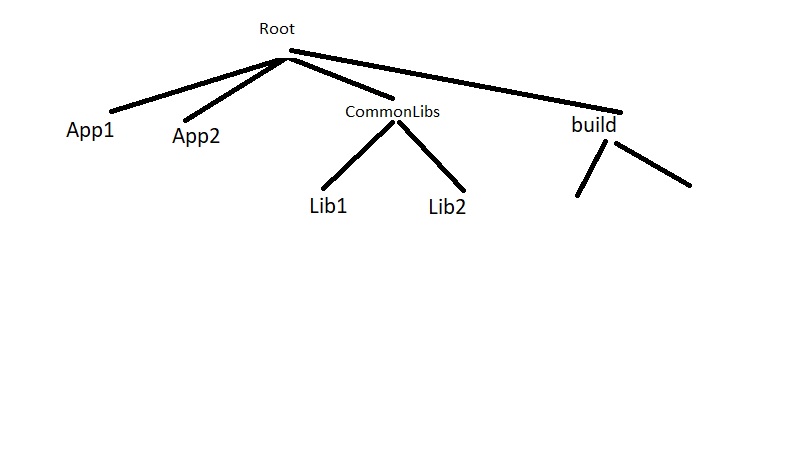
Being able to use relative paths in add\_subdirectory seems like something that would be needed often. The attached image shows the code structure in our company. There are a bunch of common libraries such as Lib1, Lib2 etc. We need to develop multiple applications such as App1, App2 etc. using those common libraries.
Now, cMakeLists.txt for App1 would live in the App1 folder; right? For it to refer to Lib1 library, it will have to use the relative path add\_subdirectory(${CMAKE\_SOURCE\_DIR}/…/CommonLibs/Lib1 …).
We would like all build artifacts (the obj files, libs and executables created) to get created out of the source directories, i.e., under root/build. How can we accomplish this using cMakePresets?
---
### Author:  [@benthevining](https://discourse.cmake.org/u/benthevining)
#### Post date: [June 10, 2022, 5:03pm UTC](https://discourse.cmake.org/t/cmakepresets-and-relative-path-in-add-subdirectory/5839/5 "2022-06-10T17:03:06Z")
With a folder structure like this, the subprojects (App1, App2) need to accept one of two scenarios:
- They can _only_ be built if this exact folder structure is present on the computer. Which is how you’re approaching it now. This is a fairly fragile approach, with more complex setup required by the user.
- They write their CMake in such a way as to be able to find their dependencies _regardless_ of the folder structure on the machine. So, instead of needing to know the exact location of the `CommonLibs` directory and calling `add_subdirectory()` on it, App1 and App2 would do either `find_package(CommonLibs)` or use FetchContent or ExternalProject.
I would recommend using solution #2 above. The CommonLibs project should define `install()` rules and export CMake package files, this makes it simple to install `CommonLibs` on a computer, and then you can build App1 or App2 on their own from anywhere else on the computer.
---
### Author:  [@jaquilio](https://discourse.cmake.org/u/jaquilio)
#### Post date: [June 10, 2022, 5:06pm UTC](https://discourse.cmake.org/t/cmakepresets-and-relative-path-in-add-subdirectory/5839/6 "2022-06-10T17:06:48Z")
Thanks! Let me explore solution #2 you suggested.
By chance, does anybody have a link to a public repo (e.g., on Github) which is a good example for following solution #2?
---
### Author:  [@benthevining](https://discourse.cmake.org/u/benthevining)
#### Post date: [June 10, 2022, 5:09pm UTC](https://discourse.cmake.org/t/cmakepresets-and-relative-path-in-add-subdirectory/5839/7 "2022-06-10T17:09:31Z")
Here’s a set of two repos that use this pattern:
Oranges is a library of CMake modules and scripts. It uses CMake install rules and exports CMake package files:
> **[GitHub - benthevining/Oranges: CMake modules, scripts, and utilities](https://github.com/benthevining/Oranges)**
>
> CMake modules, scripts, and utilities. Contribute to benthevining/Oranges development by creating an account on GitHub.
And Limes is a C++ library that depends on Oranges’ CMake scripts for its build configuration:
> **[GitHub - benthevining/Limes: C++ utilities and building blocks](https://github.com/benthevining/Limes)**
>
> C++ utilities and building blocks. Contribute to benthevining/Limes development by creating an account on GitHub.
In its main CMakeLists.txt, you can see I’m doing: `find_package (Oranges 2.24.0 REQUIRED)`. The Oranges repository itself doesn’t even have to be present on the Limes dev machine, the user could’ve just unpacked a tarball.
---
### Author:  [@jaquilio](https://discourse.cmake.org/u/jaquilio)
#### Post date: [June 10, 2022, 5:40pm UTC](https://discourse.cmake.org/t/cmakepresets-and-relative-path-in-add-subdirectory/5839/8 "2022-06-10T17:40:56Z")
Thanks for the link! Just wondering… Is the approach of solution #2 above more suited for the case where the libraries under CommonLibs are more mature whose source code doesn’t change often?
In our usage, the code for at least some of the libraries under CommonLibs need to be changed as we work on the apps (App1, App2,…). In the old Visual Studio project days prior to using CMake, in our solution, all the libs and an app would be under a single solution where changing the code for a library would automatically trigger the App to be rebuilt. Such a behavior would be ideally what I would hope for.
---
### Author:  [@benthevining](https://discourse.cmake.org/u/benthevining)
#### Post date: [June 10, 2022, 6:03pm UTC](https://discourse.cmake.org/t/cmakepresets-and-relative-path-in-add-subdirectory/5839/9 "2022-06-10T18:03:57Z")
That’s a good question.
My actual workflow is slightly more complex than exactly what I said, but the basic outline is the same.
Just like you said, for the actual development process, if I’m developing a `ProjectA` that depends on `ProjectB`:
- I want to be able to Clone `ProjectA`'s repo, run cmake configure, and have it work out of the box without doing anything else – even if `ProjectB` is not installed on the system.
- If I’m also developing a local copy of `ProjectB`'s repo, I want to be able to point `ProjectA`'s cmake at the local copy of `ProjectB`
- I want to be able to test my in-development copy of `ProjectA` against a system install of the latest version of `ProjectB`
So, when CMake’s `find_package` command runs, it looks for both:
- “config files”: package files that can be generated _by CMake_ that describe how to load an installation of your project. These would typically be found after a package has been installed to the system.
- “find modules”: CMake scripts that can be hand-written by anyone that CMake executes to see if a package can be located. These can be written by anyone for any package, and told to CMake by putting their locations into the `CMAKE_MODULE_PATH` variable.
CMake itself has variables that control which kind of files it tries to look for first when searching for packages, see [CMAKE\_FIND\_PACKAGE\_PREFER\_CONFIG](https://cmake.org/cmake/help/latest/variable/CMAKE_FIND_PACKAGE_PREFER_CONFIG.html).
If `ProjectB` already exports CMake package files, then `PackageA` finding and loading an installed version of `PackageB` will already work out of the box.
To support the cases where an installed copy of `ProjectB` cannot be found, we can provide a CMake script called `FindPackageB` in `ProjectA`'s source tree. In my projects, you’ll notice in Limes’s cmake/ directory there is a FindOranges.cmake. Oranges’s source tree actually includes this file, so any project that uses Oranges can copy it verbatim into their source tree and commit it.
What this find module does is pretty simple:
- Allow the path to the dependency to be set explicitly, either by a CMake variable or an environment variable. If it is set, this script will effectively just do `add_subdirectory()`.
- Use CMake’s built-in FetchContent module to fetch the sources from GitHub and then call `add_subdirectory()` on the fetched sources.
An example of such a script is here: [Limes/FindOranges.cmake at main · benthevining/Limes · GitHub](https://github.com/benthevining/Limes/blob/main/cmake/FindOranges.cmake)
I also wrote a Python script that will generate one for you: [Oranges/generate\_find\_module.py at main · benthevining/Oranges · GitHub](https://github.com/benthevining/Oranges/blob/main/templates/generate_find_module.py)
So now, in my development situation, if I am locally working on both Oranges and Limes, I can put the environment variable: `export ORANGES_PATH=` in a dotfile somewhere, and then I can build Limes from its directory without changing its source code at all. You can also tell the path at configure time, so I could configure Limes with: `cmake -B Builds -D ORANGES_PATH=<>`. Or, if I do neither of those, I can also run `cmake --install` from the Oranges directory, and then configure Limes and it will find the installed Oranges package.