# Cmake test error when installing Caffe, cl.exe is not able to compile a simple test program.
**URL:** https://discourse.cmake.org/t/cmake-test-error-when-installing-caffe-cl-exe-is-not-able-to-compile-a-simple-test-program/5206
**Category:** Usage
**Tags:** gen:vs, os:windows, gen:ninja
**Created:** [March 11, 2022, 3:12pm UTC](https://discourse.cmake.org/t/cmake-test-error-when-installing-caffe-cl-exe-is-not-able-to-compile-a-simple-test-program/5206 "2022-03-11T15:12:16Z")
**Posts on this page:** 4
**Page:** 1
### Author:  [@N\_fo](https://discourse.cmake.org/u/N_fo)
#### Post date: [March 11, 2022, 3:12pm UTC](https://discourse.cmake.org/t/cmake-test-error-when-installing-caffe-cl-exe-is-not-able-to-compile-a-simple-test-program/5206/1 "2022-03-11T15:12:16Z")
Hi all,
I am installing [Caffe](https://github.com/BVLC/caffe/tree/windows) for windows 11. In one of the steps ( running `C:\Projects\caffe> scripts\build_win.cmd` according to the installation guide on Caffe github page), I get the following errors:
> `-
```auto
- Detecting C compiler ABI info - failed`
> -- Check for working C compiler: C:/Program Files (x86)/Microsoft Visual Studio 14.0/VC/bin/amd64/cl.exe - broken
CMake Error at C:/cmake-3.22.3-windows-x86_64/share/cmake-3.22/Modules/CMakeTestCCompiler.cmake:69 (message):
The C compiler
"C:/Program Files (x86)/Microsoft Visual Studio 14.0/VC/bin/amd64/cl.exe"
is not able to compile a simple test program.
```
Do you know what is the problem and it can be solved?
.
.
.
.
.
.
.
.
.
the following is the complete response in the cmd:
```auto
> C:\projects\caffe\scripts>build_win.cmd
The system cannot find the drive specified.
The system cannot find the drive specified.
INFO: ============================================================
INFO: Summary:
INFO: ============================================================
INFO: MSVC_VERSION = 14
INFO: WITH_NINJA = 1
INFO: CMAKE_GENERATOR = "Ninja"
INFO: CPU_ONLY = 0
INFO: CUDA_ARCH_NAME = Auto
INFO: CMAKE_CONFIG = Release
INFO: USE_NCCL = 0
INFO: CMAKE_BUILD_SHARED_LIBS = 0
INFO: PYTHON_VERSION = 2
INFO: BUILD_PYTHON = 1
INFO: BUILD_PYTHON_LAYER = 1
INFO: BUILD_MATLAB = 0
INFO: PYTHON_EXE = "python"
INFO: RUN_TESTS = 0
INFO: RUN_LINT = 0
INFO: RUN_INSTALL = 0
INFO: ============================================================
-- The C compiler identification is MSVC 19.0.24215.1
-- The CXX compiler identification is MSVC 19.0.24215.1
-- Detecting C compiler ABI info
-- Detecting C compiler ABI info - failed
-- Check for working C compiler: C:/Program Files (x86)/Microsoft Visual Studio 14.0/VC/bin/amd64/cl.exe
-- Check for working C compiler: C:/Program Files (x86)/Microsoft Visual Studio 14.0/VC/bin/amd64/cl.exe - broken
CMake Error at C:/cmake-3.22.3-windows-x86_64/share/cmake-3.22/Modules/CMakeTestCCompiler.cmake:69 (message):
The C compiler
"C:/Program Files (x86)/Microsoft Visual Studio 14.0/VC/bin/amd64/cl.exe"
is not able to compile a simple test program.
It fails with the following output:
Change Dir: C:/projects/caffe/scripts/build/CMakeFiles/CMakeTmp
Run Build Command(s):C:/projects/ninja-1.10.2/ninja.exe cmTC_11b32 && [1/2] Building C object CMakeFiles\cmTC_11b32.dir\testCCompiler.c.obj
[2/2] Linking C executable cmTC_11b32.exe
FAILED: cmTC_11b32.exe
cmd.exe /C "cd . && C:\cmake-3.22.3-windows-x86_64\bin\cmake.exe -E vs_link_exe --intdir=CMakeFiles\cmTC_11b32.dir --rc=rc --mt=CMAKE_MT-NOTFOUND --manifests -- C:\PROGRA~2\MICROS~1.0\VC\bin\amd64\link.exe /nologo CMakeFiles\cmTC_11b32.dir\testCCompiler.c.obj /out:cmTC_11b32.exe /implib:cmTC_11b32.lib /pdb:cmTC_11b32.pdb /version:0.0 /debug /INCREMENTAL /subsystem:console kernel32.lib user32.lib gdi32.lib winspool.lib shell32.lib ole32.lib oleaut32.lib uuid.lib comdlg32.lib advapi32.lib && cd ."
RC Pass 1: command "rc /fo CMakeFiles\cmTC_11b32.dir/manifest.res CMakeFiles\cmTC_11b32.dir/manifest.rc" failed (exit code 0) with the following output:
The system cannot find the file specified
ninja: build stopped: subcommand failed.
CMake will not be able to correctly generate this project.
Call Stack (most recent call first):
CMakeLists.txt:18 (project)
-- Configuring incomplete, errors occurred!
See also "C:/projects/caffe/scripts/build/CMakeFiles/CMakeOutput.log".
See also "C:/projects/caffe/scripts/build/CMakeFiles/CMakeError.log".
ERROR: Configure failed
```
---
### Author:  [@bill.hoffman](https://discourse.cmake.org/u/bill.hoffman)
#### Post date: [March 11, 2022, 10:12pm UTC](https://discourse.cmake.org/t/cmake-test-error-when-installing-caffe-cl-exe-is-not-able-to-compile-a-simple-test-program/5206/2 "2022-03-11T22:12:34Z")
Did you run vcvars and setup your compiler environment?
---
### Author:  [@N\_fo](https://discourse.cmake.org/u/N_fo)
#### Post date: [March 13, 2022, 10:00am UTC](https://discourse.cmake.org/t/cmake-test-error-when-installing-caffe-cl-exe-is-not-able-to-compile-a-simple-test-program/5206/3 "2022-03-13T10:00:02Z")
before this, I got errors for vcvarsall.bat that couldn’t be found in the VC folder VS 14.0 directory.
Apparently, I have multiple versions installed and this file was in under another directory. what I did was I moved it from directories of previous versions to V14.0:
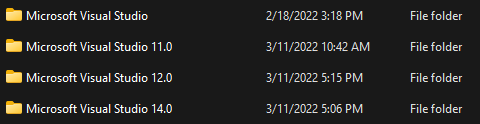
I also got errors regarding C and CXX compiler environments. I re-installed it and now it seems those errors are gone.
does this answer your question? I might miss some details here and there because I don’t have much experience working with these programs.
---
### Author:  [@bill.hoffman](https://discourse.cmake.org/u/bill.hoffman)
#### Post date: [March 14, 2022, 10:06pm UTC](https://discourse.cmake.org/t/cmake-test-error-when-installing-caffe-cl-exe-is-not-able-to-compile-a-simple-test-program/5206/4 "2022-03-14T22:06:58Z")
So, you should make sure that your compiler is installed correctly and working from the command line that you are running CMake from. To test this create a very simple c++ program in foo.cxx.
`int main(int, char**) { return 0;}`
You should then be able to compile it without error like this:
```auto
cl foo.cxx
Microsoft (R) C/C++ Optimizing Compiler Version 19.29.30136 for x64
Copyright (C) Microsoft Corporation. All rights reserved.
foo.cxx
Microsoft (R) Incremental Linker Version 14.29.30136.0
Copyright (C) Microsoft Corporation. All rights reserved.
/out:foo.exe
foo.obj
```
Once that works CMake should work.