### Author:  [@Al-AmeenAdewunmi](https://discourse.cmake.org/u/Al-AmeenAdewunmi)
#### Post date: [September 21, 2023, 7:44pm UTC](https://discourse.cmake.org/t/cmake-cmd-doesnt-detect-vs-2022/9045/1 "2023-09-21T19:44:32Z")
Exactly what it says in the title. Initially, I kept getting this error:
```auto
-- The C compiler identification is unknown
-- The CXX compiler identification is unknown
CMake Error at CMakeLists.txt:3 (project):
No CMAKE_C_COMPILER could be found.
Tell CMake where to find the compiler by setting either the environment
variable "CC" or the CMake cache entry CMAKE_C_COMPILER to the full path to
the compiler, or to the compiler name if it is in the PATH.
CMake Error at CMakeLists.txt:3 (project):
No CMAKE_CXX_COMPILER could be found.
Tell CMake where to find the compiler by setting either the environment
variable "CXX" or the CMake cache entry CMAKE_CXX_COMPILER to the full path
to the compiler, or to the compiler name if it is in the PATH.
-- Configuring incomplete, errors occurred!
```
I used cmake --help to see the list of generators and VS 2022 is nowhere to be found.
```auto
Generators
The following generators are available on this platform (* marks default):
* Unix Makefiles = Generates standard UNIX makefiles.
Ninja = Generates build.ninja files.
Ninja Multi-Config = Generates build-.ninja files.
CodeBlocks - Ninja = Generates CodeBlocks project files.
CodeBlocks - Unix Makefiles = Generates CodeBlocks project files.
CodeLite - Ninja = Generates CodeLite project files.
CodeLite - Unix Makefiles = Generates CodeLite project files.
Eclipse CDT4 - Ninja = Generates Eclipse CDT 4.0 project files.
Eclipse CDT4 - Unix Makefiles= Generates Eclipse CDT 4.0 project files.
Kate - Ninja = Generates Kate project files.
Kate - Unix Makefiles = Generates Kate project files.
Sublime Text 2 - Ninja = Generates Sublime Text 2 project files.
Sublime Text 2 - Unix Makefiles
= Generates Sublime Text 2 project files.
```
Then I try forcing CMake to use VS 2022 but I get this error:
`"CMake Error: CMAKE_GENERATOR was set but the specified generator doesn't exist. Using CMake default."`
What’s really frustrating is that this only happens when using CMD. When I run CMake-GUI, it actually does detect VS 2022. So what’s going on?
---
### Author:  [@jtxa](https://discourse.cmake.org/u/jtxa)
#### Post date: [September 21, 2023, 9:03pm UTC](https://discourse.cmake.org/t/cmake-cmd-doesnt-detect-vs-2022/9045/2 "2023-09-21T21:03:04Z")
As the VS generator is missing, I guess you’re not using the normal Windows build of CMake. This may be some CYGWIN or MSYS build.
Download the official Windows build and try that instead.
---
### Author:  [@Al-AmeenAdewunmi](https://discourse.cmake.org/u/Al-AmeenAdewunmi)
#### Post date: [September 21, 2023, 9:46pm UTC](https://discourse.cmake.org/t/cmake-cmd-doesnt-detect-vs-2022/9045/3 "2023-09-21T21:46:13Z")
The MSYS build? You mean this?
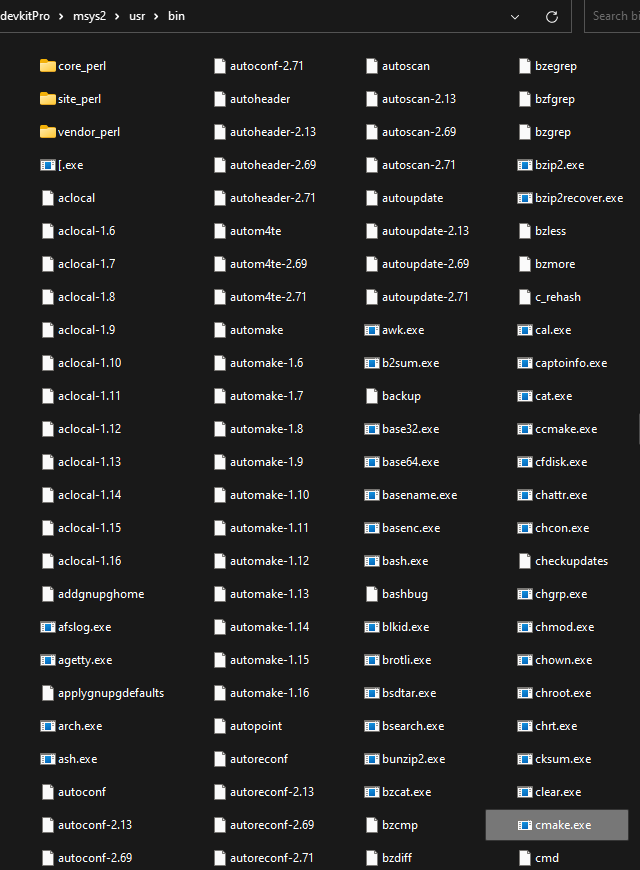
If this is what’s causing it, then what should I do so I can use the command line correctly?
---
### Author:  [@jtxa](https://discourse.cmake.org/u/jtxa)
#### Post date: [September 21, 2023, 10:09pm UTC](https://discourse.cmake.org/t/cmake-cmd-doesnt-detect-vs-2022/9045/4 "2023-09-21T22:09:51Z")
Yes, that CMake is meant for building inside MSYS usually targeting MSYS, with a compiler installed there.
Install a CMake from the [official site](https://cmake.org/download/) instead.
As an alternative you can use the one installed with VS2022 (if you have it installed). If you open a VS2022 developer command prompt, it should be in the PATH. Further details and possibilities are mentioned in the [documentation](https://learn.microsoft.com/en-us/cpp/build/cmake-projects-in-visual-studio?view=msvc-170).
---
### Author:  [@Al-AmeenAdewunmi](https://discourse.cmake.org/u/Al-AmeenAdewunmi)
#### Post date: [September 21, 2023, 10:22pm UTC](https://discourse.cmake.org/t/cmake-cmd-doesnt-detect-vs-2022/9045/5 "2023-09-21T22:22:23Z")
No see, I already have the official CMake installed, and I’m still getting this issue. I’m asking if the MSYS version is somehow creating conflict.
---
### Author:  [@jtxa](https://discourse.cmake.org/u/jtxa)
#### Post date: [September 22, 2023, 12:15am UTC](https://discourse.cmake.org/t/cmake-cmd-doesnt-detect-vs-2022/9045/6 "2023-09-22T00:15:22Z")
Depending on the installation order, one might in front of the other.
Check with `where cmake` which executable is found. Fix your `PATH` to be in the desired order.
---
### Author:  [@Al-AmeenAdewunmi](https://discourse.cmake.org/u/Al-AmeenAdewunmi)
#### Post date: [September 22, 2023, 12:41pm UTC](https://discourse.cmake.org/t/cmake-cmd-doesnt-detect-vs-2022/9045/7 "2023-09-22T12:41:41Z")
I renamed the MSYS version to something else and now it targets the Windows build instead. And now everything works. Thanks.