# Cannot set toolset when configuring with the Visual Studio 2022 generator.
**URL:** https://discourse.cmake.org/t/cannot-set-toolset-when-configuring-with-the-visual-studio-2022-generator/10160
**Category:** Usage
**Tags:** os:windows, comp:msvc, gen:vs
**Created:** [February 22, 2024, 7:04pm UTC](https://discourse.cmake.org/t/cannot-set-toolset-when-configuring-with-the-visual-studio-2022-generator/10160 "2024-02-22T19:04:10Z")
**Posts on this page:** 16
**Page:** 1
### Author:  [@teo-tsirpanis](https://discourse.cmake.org/u/teo-tsirpanis)
#### Post date: [February 22, 2024, 7:04pm UTC](https://discourse.cmake.org/t/cannot-set-toolset-when-configuring-with-the-visual-studio-2022-generator/10160/1 "2024-02-22T19:04:10Z")
I have installed on my machine Visual Studio 2022 17.9 with the MSVC toolsets 14.36, 14.38 and 14.39. I created with Visual Studio a new “CMake project” and after configuring it with `cmake -S . -B build -G "Visual Studio 17 2022"` I noticed that CMake is choosing MSVC 14.36; the oldest one.
I tried to manually choose the latest toolset by passing `-T v143,version=14.39` but every time it fails with `No CMAKE_C/CXX_COMPILER could be found.`. I tried the same while under the Visual Studio developer Powershell (both with and without specifying `-vcvars_ver=14.39`) but the result has been either failure to find the compiler, or finding 14.36.
Am I doing something wrong? Thanks.
---
### Author:  [@ben.boeckel](https://discourse.cmake.org/u/ben.boeckel)
#### Post date: [February 27, 2024, 2:05pm UTC](https://discourse.cmake.org/t/cannot-set-toolset-when-configuring-with-the-visual-studio-2022-generator/10160/2 "2024-02-27T14:05:59Z")
@brad.king Is this the Visual Studio toolchain bug?
---
### Author:  [@brad.king](https://discourse.cmake.org/u/brad.king)
#### Post date: [February 27, 2024, 2:26pm UTC](https://discourse.cmake.org/t/cannot-set-toolset-when-configuring-with-the-visual-studio-2022-generator/10160/3 "2024-02-27T14:26:07Z")
VS 17’s v143 minor toolsets 14.36 through 14.39 cannot be used by `-T version=` due to a bug in VS. See [VS Developer Community feedback item 10385615](https://developercommunity.visualstudio.com/t/MicrosoftVCToolsVersion1436176prop/10385615) and [CMake Issue 25192](https://gitlab.kitware.com/cmake/cmake/-/issues/25192).
In the Visual Studio Installer’s section for VS 17.9, look under `Desktop development with C++` and make sure the `MSVC v143 - VS 2022 C++ x64/x86 build tools (Latest)` component is installed. If installed, CMake should choose that by default.
---
### Author:  [@teo-tsirpanis](https://discourse.cmake.org/u/teo-tsirpanis)
#### Post date: [February 27, 2024, 4:27pm UTC](https://discourse.cmake.org/t/cannot-set-toolset-when-configuring-with-the-visual-studio-2022-generator/10160/4 "2024-02-27T16:27:38Z")
I gave it another try and it printed `The CXX compiler identification is MSVC 19.38.33135.0`. The following components are installed:
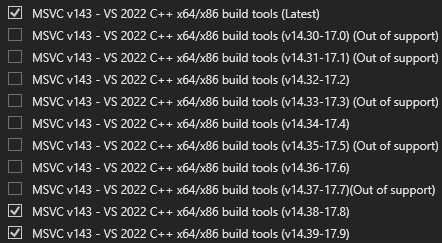
---
### Author:  [@brad.king](https://discourse.cmake.org/u/brad.king)
#### Post date: [February 27, 2024, 6:08pm UTC](https://discourse.cmake.org/t/cannot-set-toolset-when-configuring-with-the-visual-studio-2022-generator/10160/5 "2024-02-27T18:08:38Z")
Please look for a file
```plaintext
C:/Program Files/Microsoft Visual Studio/2022/*/VC/Auxiliary/Build/Microsoft.VCToolsVersion.default.txt
```
where `*` depends on the VS edition (Preview, Community, Professional, or Enterprise). What does it contain?
---
### Author:  [@teo-tsirpanis](https://discourse.cmake.org/u/teo-tsirpanis)
#### Post date: [February 27, 2024, 6:10pm UTC](https://discourse.cmake.org/t/cannot-set-toolset-when-configuring-with-the-visual-studio-2022-generator/10160/6 "2024-02-27T18:10:25Z")
14.39.33519
BTW there is also a `Microsoft.VCToolsVersion.v143.default.txt` file that contains `14.38.33130`.
---
### Author:  [@brad.king](https://discourse.cmake.org/u/brad.king)
#### Post date: [February 27, 2024, 6:13pm UTC](https://discourse.cmake.org/t/cannot-set-toolset-when-configuring-with-the-visual-studio-2022-generator/10160/7 "2024-02-27T18:13:38Z")
If those two files disagree something may be wrong with the VS installation. Try removing the “Latest” component I mentioned above and then installing it again.
---
### Author:  [@teo-tsirpanis](https://discourse.cmake.org/u/teo-tsirpanis)
#### Post date: [February 27, 2024, 6:37pm UTC](https://discourse.cmake.org/t/cannot-set-toolset-when-configuring-with-the-visual-studio-2022-generator/10160/8 "2024-02-27T18:37:50Z")
I reinstalled the “Latest” component and installed it again. The files are still different.
I am going to reinstall Visual Studio…
---
### Author:  [@brad.king](https://discourse.cmake.org/u/brad.king)
#### Post date: [February 27, 2024, 6:45pm UTC](https://discourse.cmake.org/t/cannot-set-toolset-when-configuring-with-the-visual-studio-2022-generator/10160/9 "2024-02-27T18:45:51Z")
On reinstall, select the “Latest” toolchain but don’t install any of the minor toolchains yet. Let’s make sure the basic usage works first.
---
### Author:  [@OSyrotiuk](https://discourse.cmake.org/u/OSyrotiuk)
#### Post date: [June 24, 2024, 10:28am UTC](https://discourse.cmake.org/t/cannot-set-toolset-when-configuring-with-the-visual-studio-2022-generator/10160/10 "2024-06-24T10:28:58Z")
Sorry to bother that old post.
However, I receive nearly the same error with Visual Studio 2022 17.11 Preview2 with the latest build tools of v143. This looks like the VCTargetPath is incorrect, and due to that CompilerIdCXX.proj does not compile at all. Even more, somehow that project was generate with ``
While I do not have that file, and just have C:\Program Files\Microsoft Visual Studio\2022\Preview\VC\Auxiliary\Build folder filled with .props items
---
### Author:  [@brad.king](https://discourse.cmake.org/u/brad.king)
#### Post date: [June 24, 2024, 12:51pm UTC](https://discourse.cmake.org/t/cannot-set-toolset-when-configuring-with-the-visual-studio-2022-generator/10160/11 "2024-06-24T12:51:19Z")
> [@OSyrotiuk](#):
>
> same error with Visual Studio 2022 17.11 Preview2
Running CMake 3.30.0-rc3 with `-G "Visual Studio 17 2022"` and no `-T` argument works fine for VS 17.11p2 for me. Adding `-T 14.41` gets an error, which I’m addressing in [CMake MR 9622](https://gitlab.kitware.com/cmake/cmake/-/merge_requests/9622).
---
### Author:  [@XJPan](https://discourse.cmake.org/u/XJPan)
#### Post date: [January 13, 2025, 7:38am UTC](https://discourse.cmake.org/t/cannot-set-toolset-when-configuring-with-the-visual-studio-2022-generator/10160/12 "2025-01-13T07:38:18Z")
I still have this kind of problem. Let me use the simplest scenario to demonstrate the problem -
1. My environment: Visual Studio 2022 17.10 with MSVC 14.40.33078 (only 1 MSVC Toolset installed) + CMake 3.31.4
2. Write a super simple helloWorld.cpp and CMakelist.txt for demo purpose
3. Open CMakeGUI to config the project, the VCTargetsPath.vcxproj generated is as
```auto
Utility
MultiByte
v143
```
I expect it selects MSVC 14.40 (the latest one) as toolset but t looks for MSVC 14,36 then and error out -
“error MSB8070: Cannot find MSVC toolset version ‘14.36.32532’: the folder 'C:\Program Files\Microsoft Visual Studio\2022\Professional\VC\Tools\MSVC\14.36.32532' does not exist. Please make sure MSVC toolset version ‘14.36.32532’ is installed or choose another toolset version. [D:\Test\MSVC144\CMakeFiles\3.31.4\VCTargetsPath.vcxproj]”
1. I tried to add -T option, neither formats “version=14.40.33807”, “version=14.40” or “-T 14.40” work. These options seem changing platform toolset only.
2. Changing Microsoft \*.prop as suggested above is not an option for me.
3. It is not an option for me in batch build environment to modify the vcxproj by adding
```auto
"14.40.33807"
```
My question is - how can I instrument CMake to select the correct MSVC Toolset? Or we have to rely on Microsoft Visual Studio to select the latest MSVC toolset in future release?
---
### Author:  [@Angew](https://discourse.cmake.org/u/Angew)
#### Post date: [January 14, 2025, 10:22am UTC](https://discourse.cmake.org/t/cannot-set-toolset-when-configuring-with-the-visual-studio-2022-generator/10160/13 "2025-01-14T10:22:03Z")
I believe the correct format for `-T` would be `-T v143,version=14.40.33807`. Does that work for you?
---
### Author:  [@XJPan](https://discourse.cmake.org/u/XJPan)
#### Post date: [January 15, 2025, 7:46am UTC](https://discourse.cmake.org/t/cannot-set-toolset-when-configuring-with-the-visual-studio-2022-generator/10160/14 "2025-01-15T07:46:34Z")
> [@Angew](#):
>
> -T v143,version=14.40.33807
NO, as I tried " `-T v143,version=14.40.33807`", the issue is not fixed.
---
### Author:  [@brad.king](https://discourse.cmake.org/u/brad.king)
#### Post date: [January 15, 2025, 1:41pm UTC](https://discourse.cmake.org/t/cannot-set-toolset-when-configuring-with-the-visual-studio-2022-generator/10160/15 "2025-01-15T13:41:58Z")
It works fine for me:
```auto
>cmake -B build -G "Visual Studio 17 2022" -T v143,version=14.40.33807
...
-- The C compiler identification is MSVC 19.40.33818.0
...
-- Check for working C compiler: C:/Program Files/Microsoft Visual Studio/2022/Professional/VC/Tools/MSVC/14.40.33807/bin/Hostx64/x64/cl.exe - skipped
...
```
The resulting `.vcxproj` files contain both `v143` and:
```auto
```
---
### Author:  [@brad.king](https://discourse.cmake.org/u/brad.king)
#### Post date: [January 15, 2025, 1:45pm UTC](https://discourse.cmake.org/t/cannot-set-toolset-when-configuring-with-the-visual-studio-2022-generator/10160/16 "2025-01-15T13:45:52Z")
> [@XJPan](#):
>
> Visual Studio 2022 17.10 with MSVC 14.40.33078 (only 1 MSVC Toolset installed)
@XJPan try installing the “latest” toolset in addition to the versioned toolset.